
WeChat Ecosystem Full Scenario Capabilities
Enjoy WeChat Ecosystem Capabilities More Conveniently with GenAuth!
As a WeChat Ecosystem developer, you may face many confusions when implementing WeChat login capabilities for your application:
What is the creation and configuration process of different types of applications in WeChat?
As a developer of different types of applications, what options are available when implementing WeChat login capabilities?
How to complete the configuration and login of various types of WeChat login methods?
How do you manage the user identity in the WeChat ecosystem after WeChat users log in to your newly developed application?
GenAuth WeChat Ecosystem Function Panorama
If you have the above confusion and don't know how to start, GenAuth WeChat Ecosystem Full Scenario Capabilities can help you implement WeChat login processes in various scenarios. The following table shows the full-scenario WeChat ecosystem operation process supported by GenAuth and the WeChat login capability types available in the corresponding scenarios. You can click directly to learn the required functions:
Scenario WeChat Ecosystem Operation Process WeChat Login Capability Type Mobile Application Development
- Create an application.
- Submit for review.
- Go online after passing the review.
- Mobile APP pulls up WeChat APP
- APP pulls up mini program login Website application development
- Common applications.
- Submit for review.
- Approved and launched.
- PC WeChat code scanning
- PC mini program code scanning WeChat public account development
- Complete registration and authentication on the WeChat public platform.
- Register a public account.
- Become a developer.
- Apply for WeChat authentication.
- Bind WeChat public account on WeChat Open Platform.
- Enter basic information.
- Security verification.
- Bind successfully.
- Login by scanning the WeChat public account
- Login by launching the WeChat APP in the WeChat browser Mini program development
- Register the WeChat mini program and complete the development.
- Register the mini program.
- Start development.
- Code implementation.
- Submit for review and release.
- Bind the WeChat mini program on the WeChat Open Platform.
- Enter basic information.
- Security verification.
- Bind successfully. Mini app one-click login
GenAuth WeChat ecological account system
Basic concepts of WeChat user account system
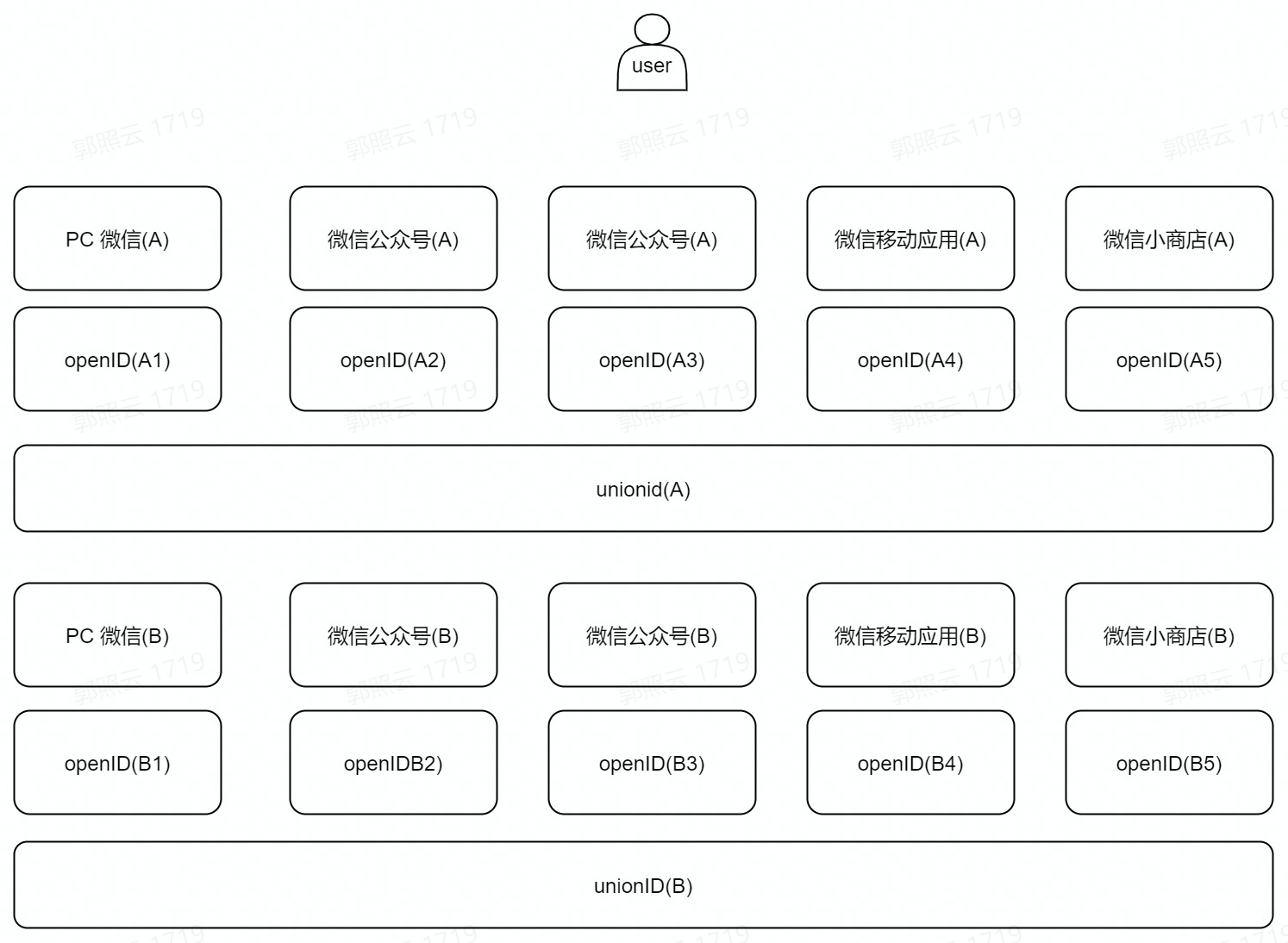
WeChat provides OpenID and UnionID as user identification. The difference between the two is as follows:
ID Name Description OpenID
- OpenID is the identity ID of WeChat users in different types of products.
- WeChat users will have unique OpenIDs when accessing public accounts, mini programs, mobile applications, website applications, small stores, etc.
- The OpenIDs generated by the same WeChat user when accessing different products are also different. For example, the OpenIDs of the same user are different for different public accounts; similarly, the OpenIDs of the same user are different for different mini programs. UnionID
- UnionID is the identity ID of WeChat users in the same open platform.
- If a developer has multiple mobile applications, website applications and public accounts (i.e. public accounts and mini-programs), UnionID can be used to distinguish the uniqueness of users. Because as long as they are mobile applications, website applications and public accounts under the same WeChat open platform account, the user's UnionID is unique, that is, the same user has the same UnionID for different applications under the same WeChat open platform.
To put it in a figurative way, the unique identification of an independent WeChat user in different login scenarios of WeChat can be shown in the following figure:
WeChat user login process in GenAuth
After understanding the WeChat user account system, it will be easier for you to understand a WeChat user's login journey in GenAuth:
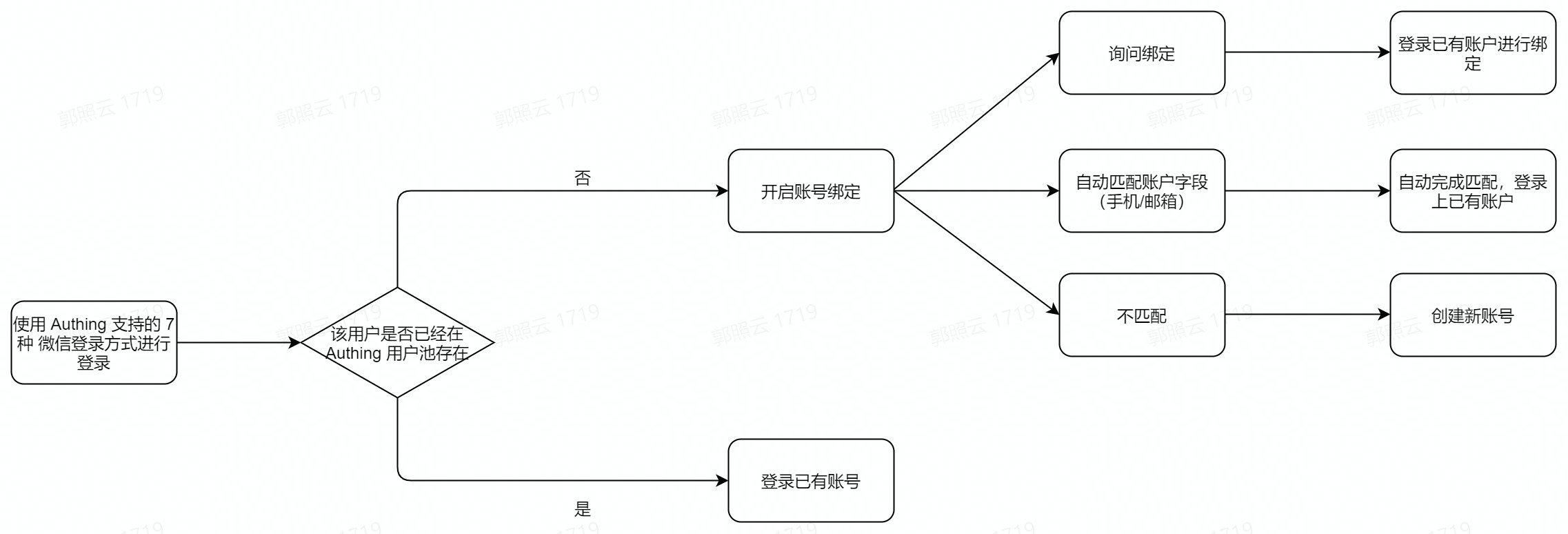
First, your user logs in using one of the seven login methods supported by GenAuth. During login, GenAuth will determine whether the user already exists in your user pool. If so, your user will directly log in to the existing account through this identity source.
If it does not exist, and your GenAuth console has enabled "account binding" for this identity source, it will be judged according to the specific functional logic that takes effect:
The user successfully binds to the existing account and logs in successfully.
Automatically match existing accounts (mobile phone/email) and complete login.
If the match is not successful/binding is unsuccessful, the user cannot log in.
GenAuth Account Solution Based on WeChat Ecosystem
Based on "whether the user exists in the GenAuth user pool" and "whether your WeChat application has been connected to the WeChat Open Platform", there are four scenarios for your account processing:
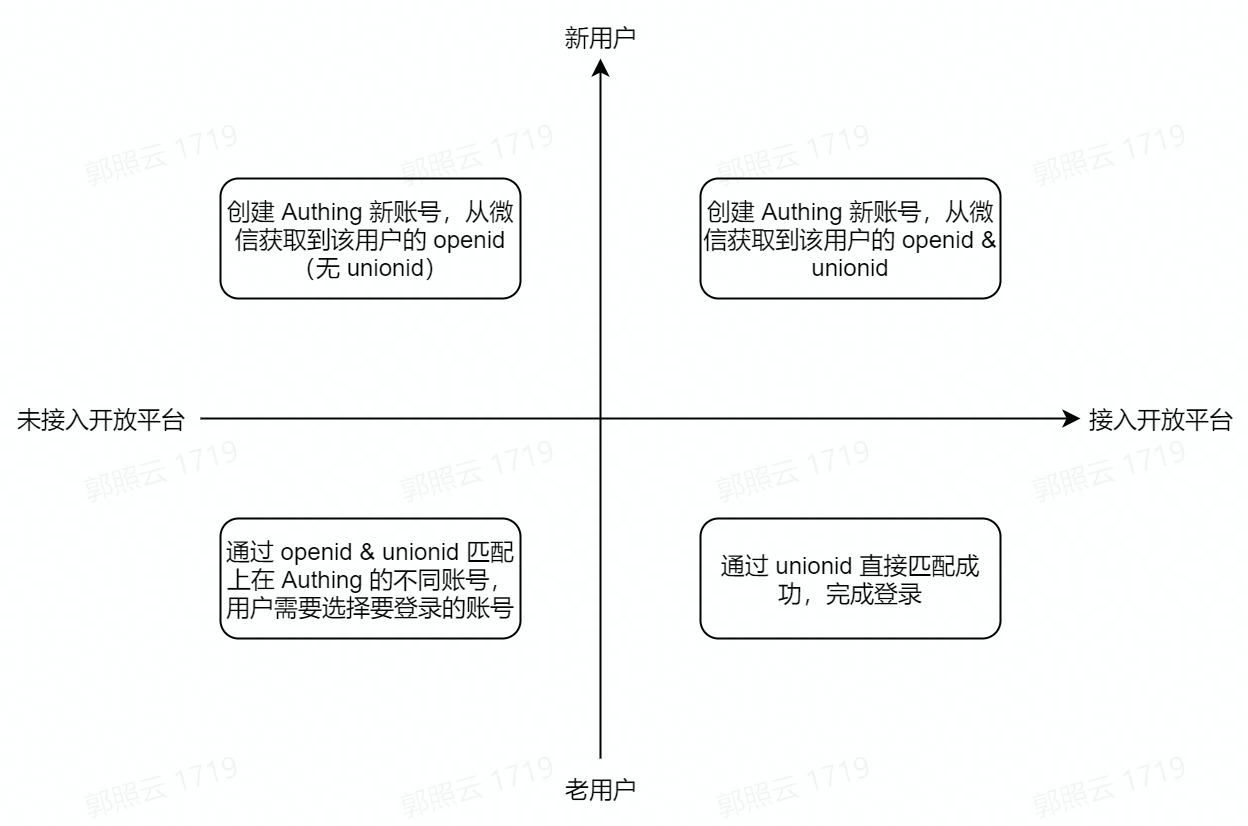
When a user of the WeChat ecosystem enters the GenAuth user pool through WeChat login, there are four possible scenarios, which are considered from two dimensions:
Does the user have
UnionIDin the WeChat Open Platform?Is the user a new user in the GenAuth user pool?
This is divided into four scenarios:
The user has
UnionIDin WeChat Open Platform and is a new user in the GenAuth user pool (first quadrant).In this case, when the user logs in to the application that has been integrated in GenAuth through WeChat for the first time, a new account will be created in your GenAuth user pool, and the user account information will include the user'sOpneIDandUnionIDobtained from WeChat Open Platform.The user does not have
UnionIDin WeChat Open Platform and is a new user in the GenAuth user pool (second quadrant). In this case, when a user logs in to an application that has been integrated in GenAuth for the first time through WeChat, a new account will be created in your GenAuth user pool. The user account information will also include theOpneIDobtained from the WeChat interface, but because the WeChat application has not joined the WeChat Open Platform, this account information does not include theUnionID.The user does not have a
UnionIDin the WeChat Open Platform and is an old user in the GenAuth user pool (third quadrant). In this case, when a user logs in to an application that has been integrated in GenAuth through WeChat, because the account already exists, it will be matched throughOpneIDandUnionIDduring login. When the same WeChat account can correspond to multiple accounts in your user pool due to differentOpneIDandUnionID, account selection will be supported, and login will be completed after selection.The user has
UnionIDin WeChat Open Platform and is an old user in the GenAuth user pool (quadrant 4). In this case, when the user logs in to the application integrated in GenAuth through WeChat, since the account already exists and there is no situation whereUnionIDdoes not exist, it will be directly matched successfully throughUnionIDand complete the login.
In what scenarios can the GenAuth WeChat ecosystem help you?
More convenient use of WeChat full-scenario login capabilities
More flexible management of user accounts from WeChat
For security and user convenience, you may not want your users to re-create an account every time they log in to GenAuth using their WeChat accounts. GenAuth supports "field matching" and "query binding" to ensure your users' unique identity in GenAuth and ensure that user account information is unified.
For details on the "account binding" function and usage, please refer to account binding.
When you use the mobile WeChat application for development
WeChat Open Platform Preparation
Register a WeChat Open Platform Account
Before developing WeChat ecosystem applications, you must first register as a developer of the WeChat Open Platform. If you do not have a WeChat Open Platform account, please go to register.
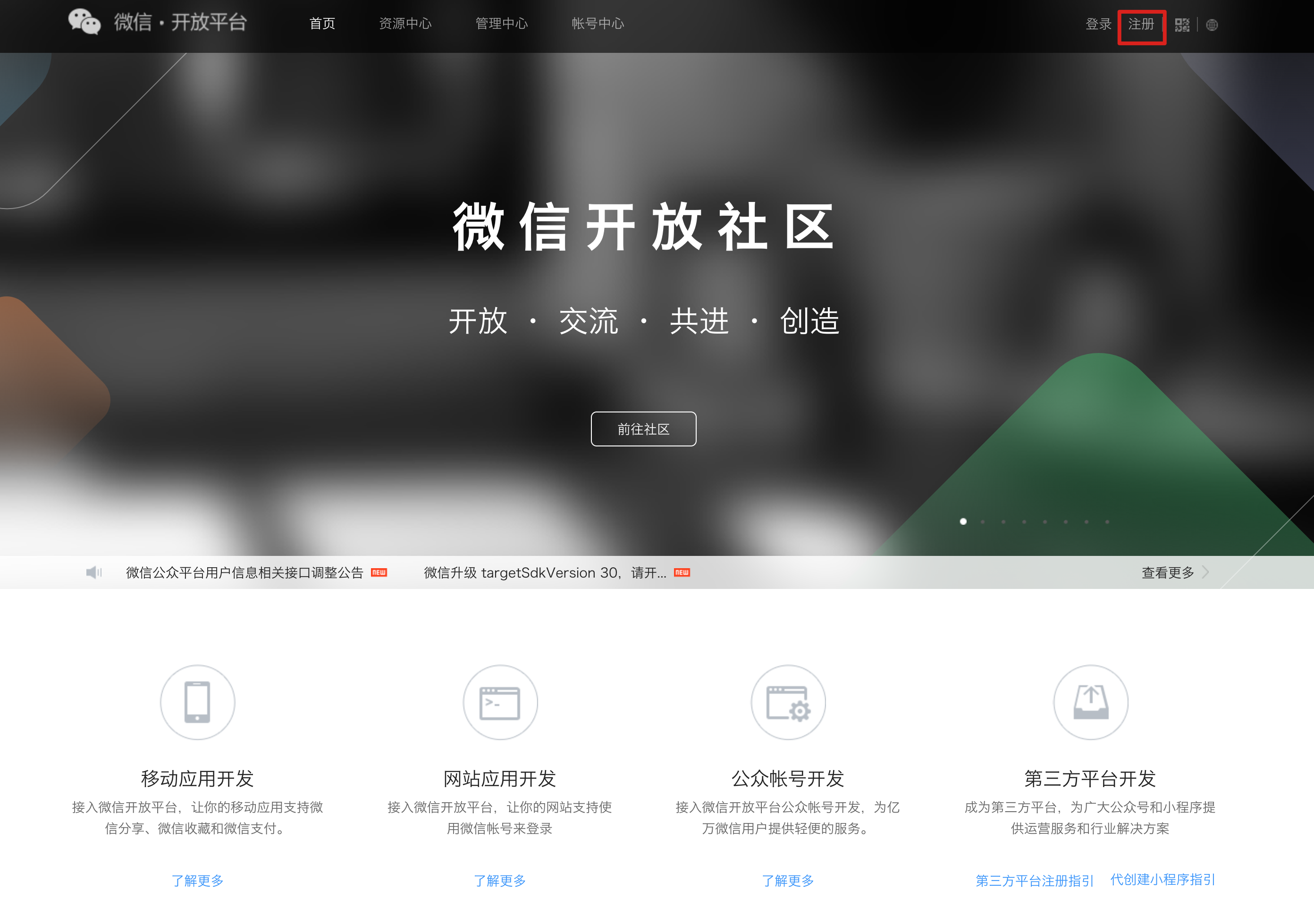
Apply for developer qualification certification
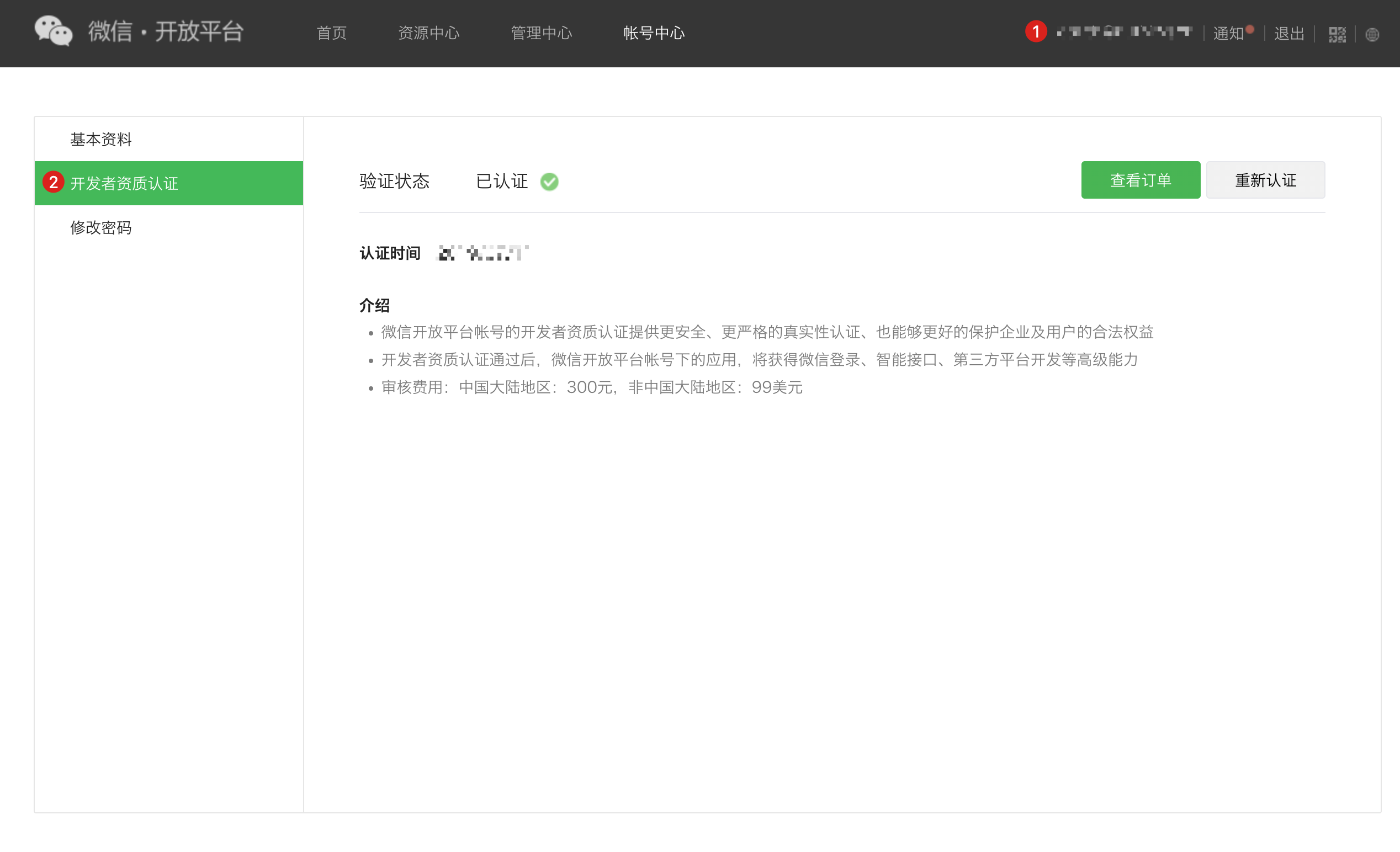
After completing the WeChat Open Platform account registration, you need to fill in the developer qualification certification application in the Account Center and wait for the certification to pass.
Launch your mobile app
Step 1: Create a mobile app
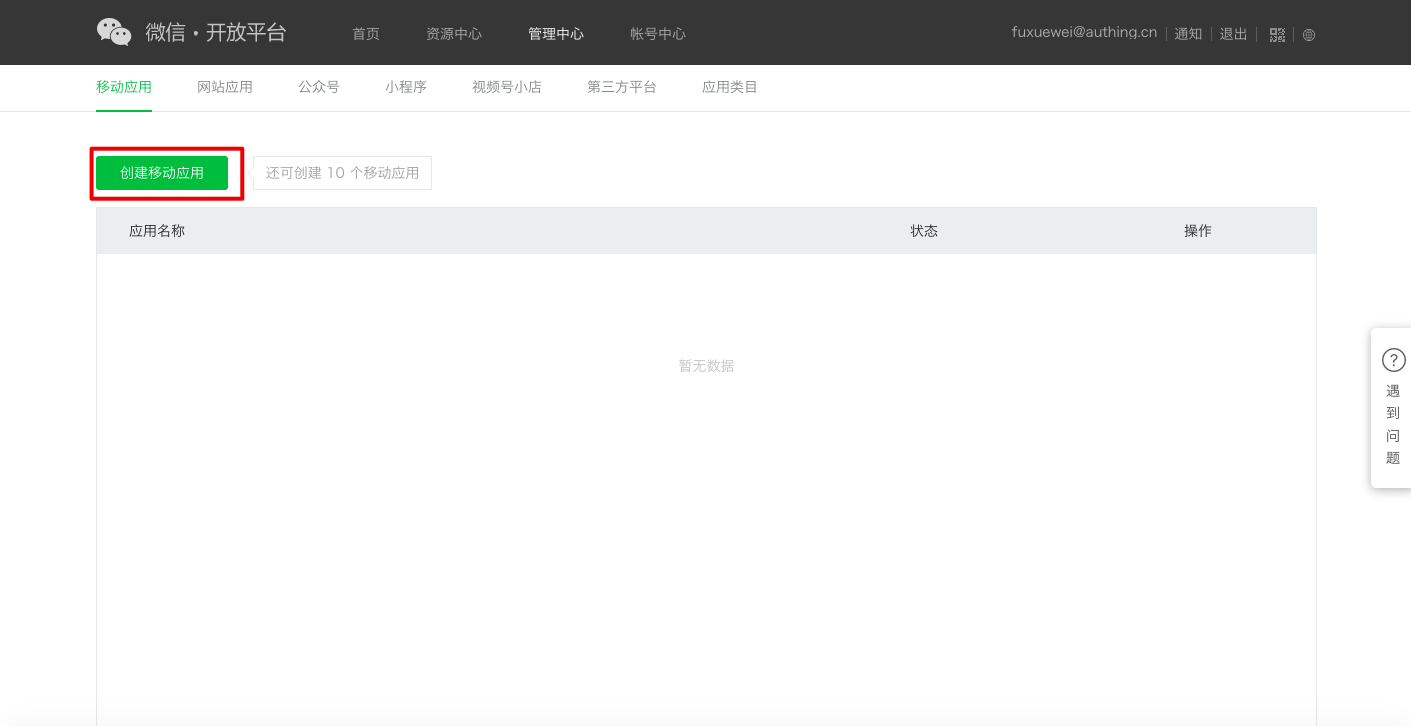
- After logging in to your WeChat Open Platform, click Create Mobile App under Admin Center->Mobile App.
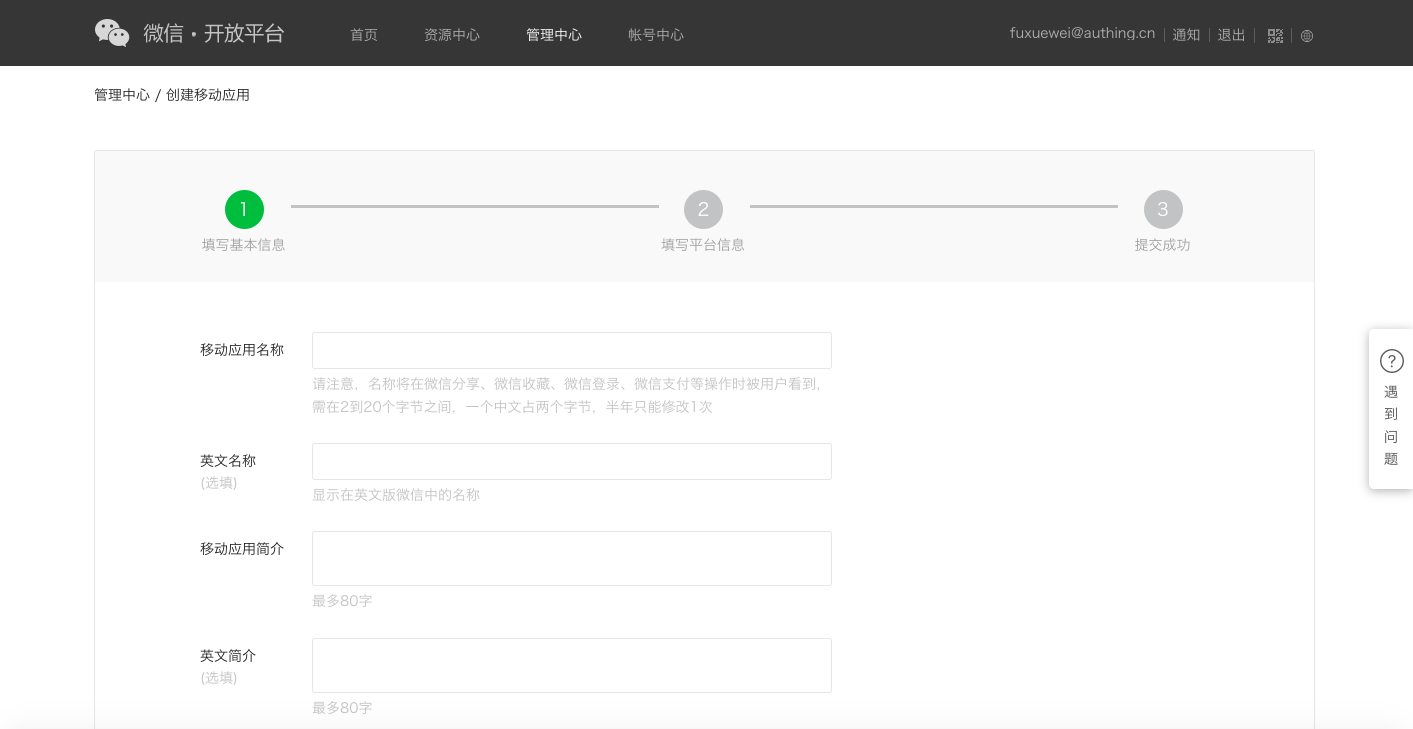
- Fill in "Fill in basic information", "Fill in platform information" in turn, and "Submit successfully".
Step 2: Submit your mobile app for review
After creating the app, you need to submit it to WeChat for review. To ensure that it is easier to pass the review, please read and comply with WeChat's Application Review Specifications in advance.
Step 3: Wait for WeChat official review to go online
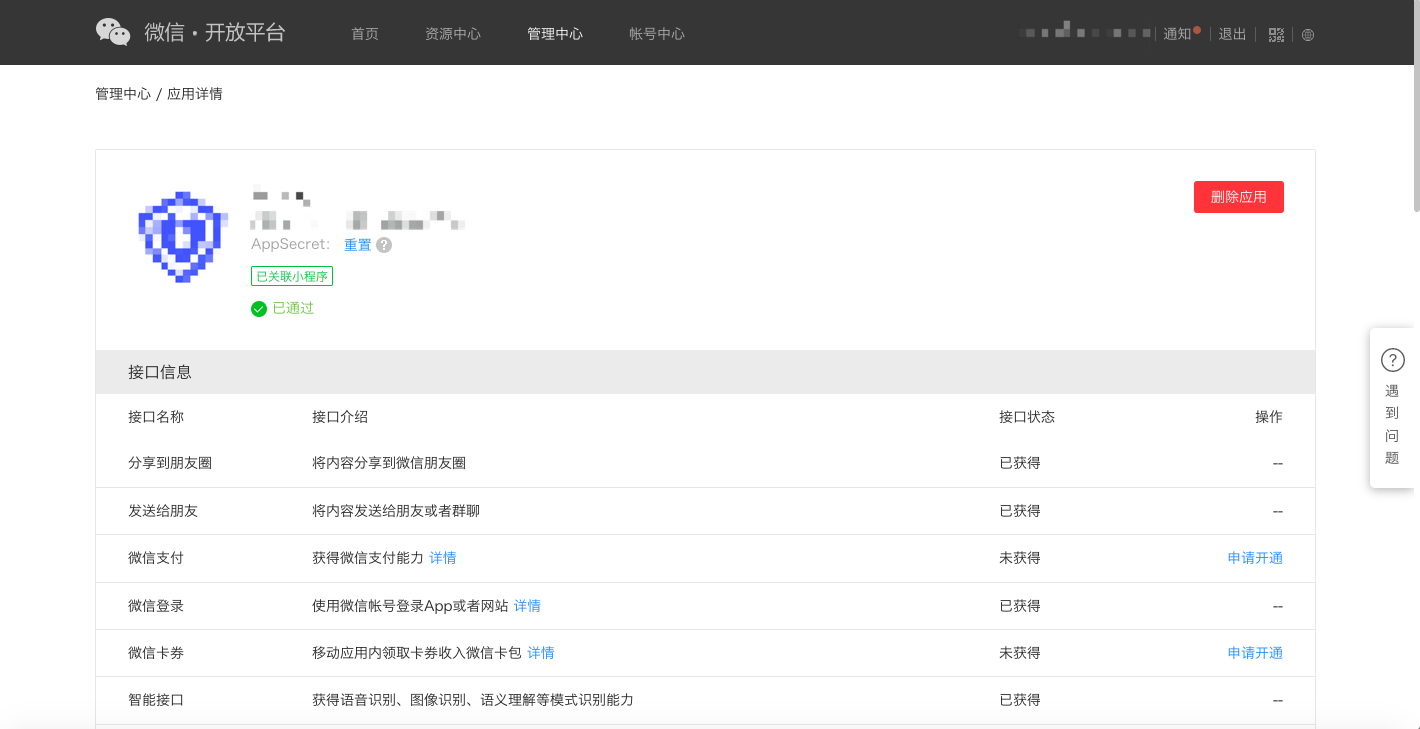
After waiting for WeChat official review to pass, when you open your WeChat mobile app, you will see the application with the status of "Reviewed".
Implement WeChat login capability in GenAuth
Developer scenarios for using WeChat login
You want to implement WeChat login capability on mobile devices by creating a WeChat application. According to the above steps, you have completed the creation of the WeChat application. Next, you do not have to read the massive and complicated WeChat documents, but can directly implement WeChat login for your application through GenAuth "zero code" method.
Choose the right WeChat login method
In the "mobile application" development scenario, GenAuth supports both WeChat login capabilities in the WeChat ecosystem:
WeChat mobile
APP launches mini program
Configuration process
To configure the mobile WeChat login method, follow the following process:
Step 1: Integrate the application that needs to configure WeChat login in GenAuth
To integrate your application in GenAuth, please refer to Connect your application to GenAuth.
Step 2: Create WeChat login method in your GenAuth user pool
GenAuth supports 20+ third-party account login methods. You can view all the identity providers supported by GenAuth in Connecting to an External Identity Provider.
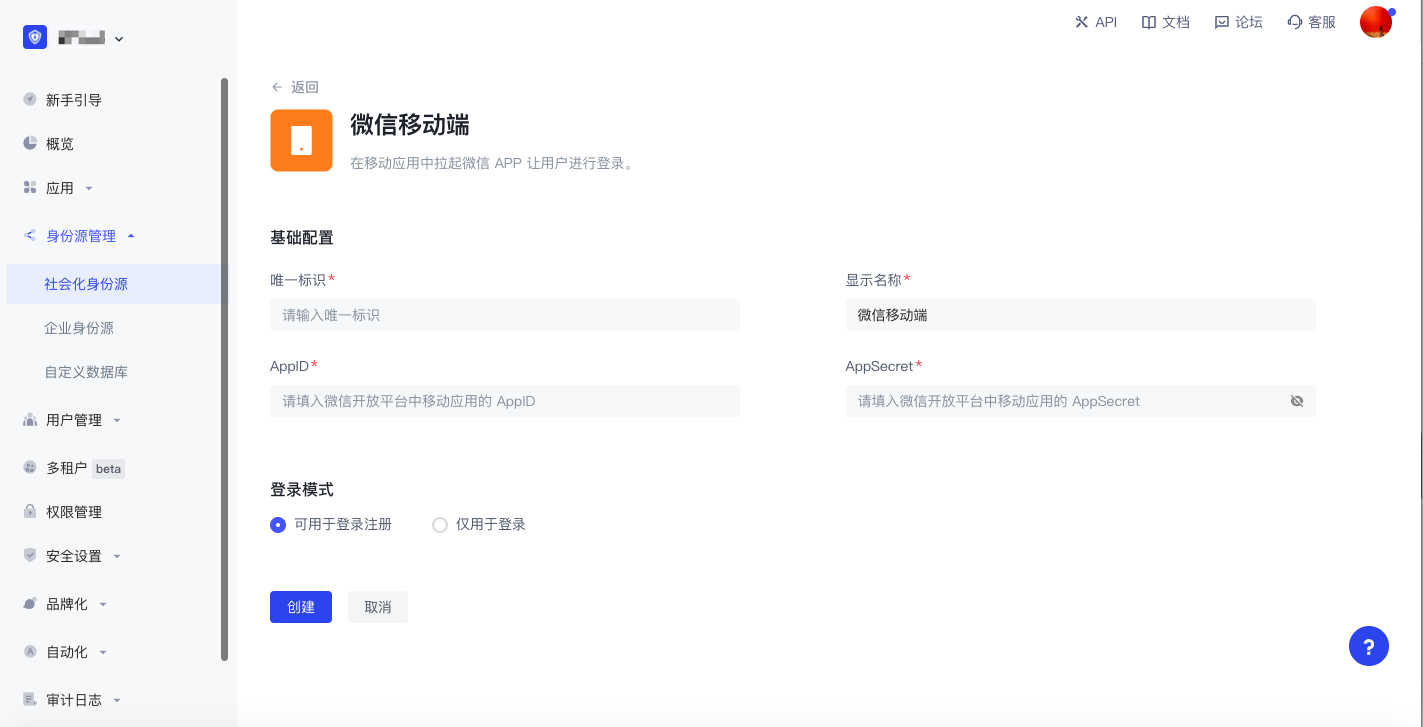
- Configure WeChat mobile login: WeChat mobile login allows your users to log in to third-party applications securely using their WeChat identity. After enabling WeChat mobile login in GenAuth, users can call up WeChat to obtain WeChat user identity information when logging in using the app. For detailed configuration process, see WeChat mobile.
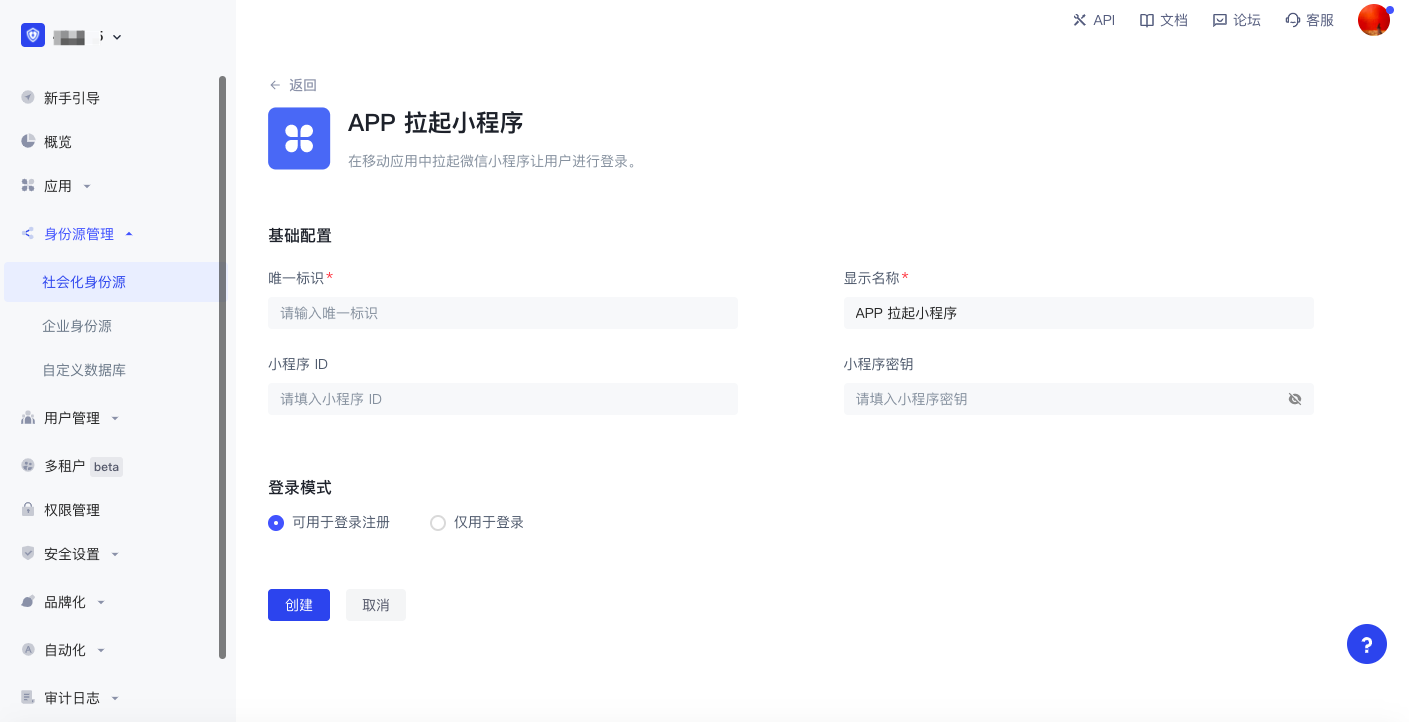
- Configure APP to launch the mini program to log in:After enabling APP to launch the mini program in GenAuth, users can call up the mini program when logging in with the APP, thereby obtaining the official real-name user information of WeChat. Users can complete registration or login with their real number with one-click authorization. For detailed configuration process, see APP launches WeChat mini program.
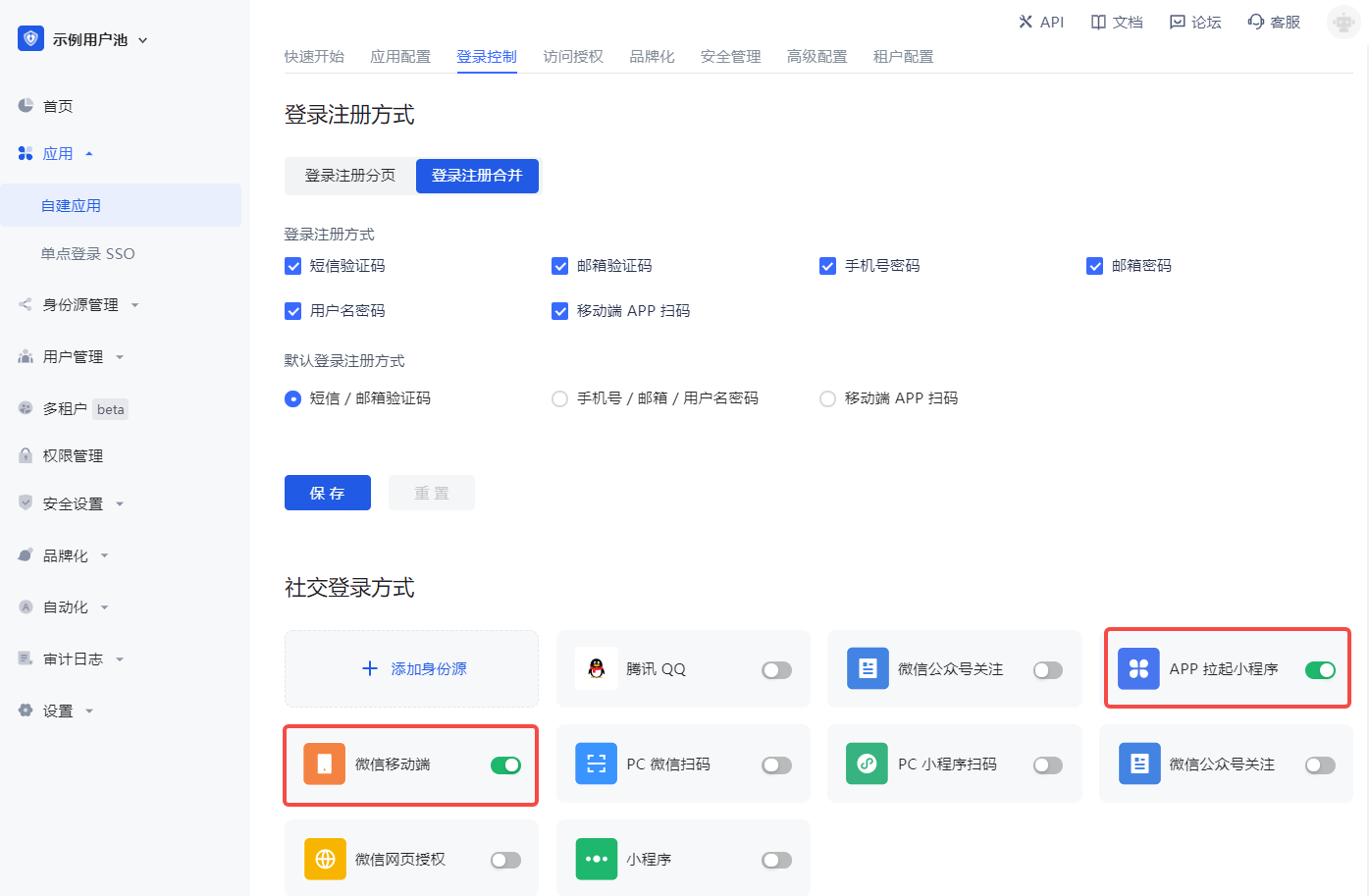
Step 3: Enable the WeChat login method you configured for the integrated GenAuth application
After completing the third-party login configuration, enable the corresponding login method in the application you have integrated:
Congratulations! You have completed the WeChat login configuration. Now you can experience the WeChat login you implemented in the "Experience Login" of the application!
Daily account management of WeChat application
User accounts on the WeChat platform use OpenID and UnionID as unique identifiers. Since WeChat did not require all applications to join the WeChat Open Platform in the early years, some accounts do not have Unionid. Later WeChat specifications require that all applications must rely on the WeChat Open Platform. Users who log in through apps created by WeChat Open Platform have both OpenID and UnionID as unique identifiers. For the difference between the two, please refer to Introduction to WeChat Ecosystem Account System.
Based on WeChat's account system, there are two scenarios when your users log in through WeChat:
New users log in through WeChat
Old users log in through WeChat
For different scenarios of new and old users logging in, GenAuth supports the "account binding" function to ensure the uniqueness of your users' accounts in GenAuth.
For an introduction to the "account binding" function and usage details, please refer to account binding.
Other notes
When your app on WeChat Open Platform has been offline or deactivated, the app you integrated in GenAuth will no longer be able to log in using WeChat.
When you use the web version of WeChat application for development
WeChat Open Platform preparation
Register a WeChat Open Platform account
Before developing WeChat ecosystem applications, you must first register as a developer of WeChat Open Platform. If you do not have a WeChat Open Platform account, please go to register.
Apply for developer qualification certification
After completing the WeChat Open Platform account registration, you need to fill in the developer qualification certification application in Account Center and wait for the certification to pass.
Launch your website application
Step 1: Create a website application
- After logging in to your WeChat Open Platform, follow the steps below to find Create a website application:
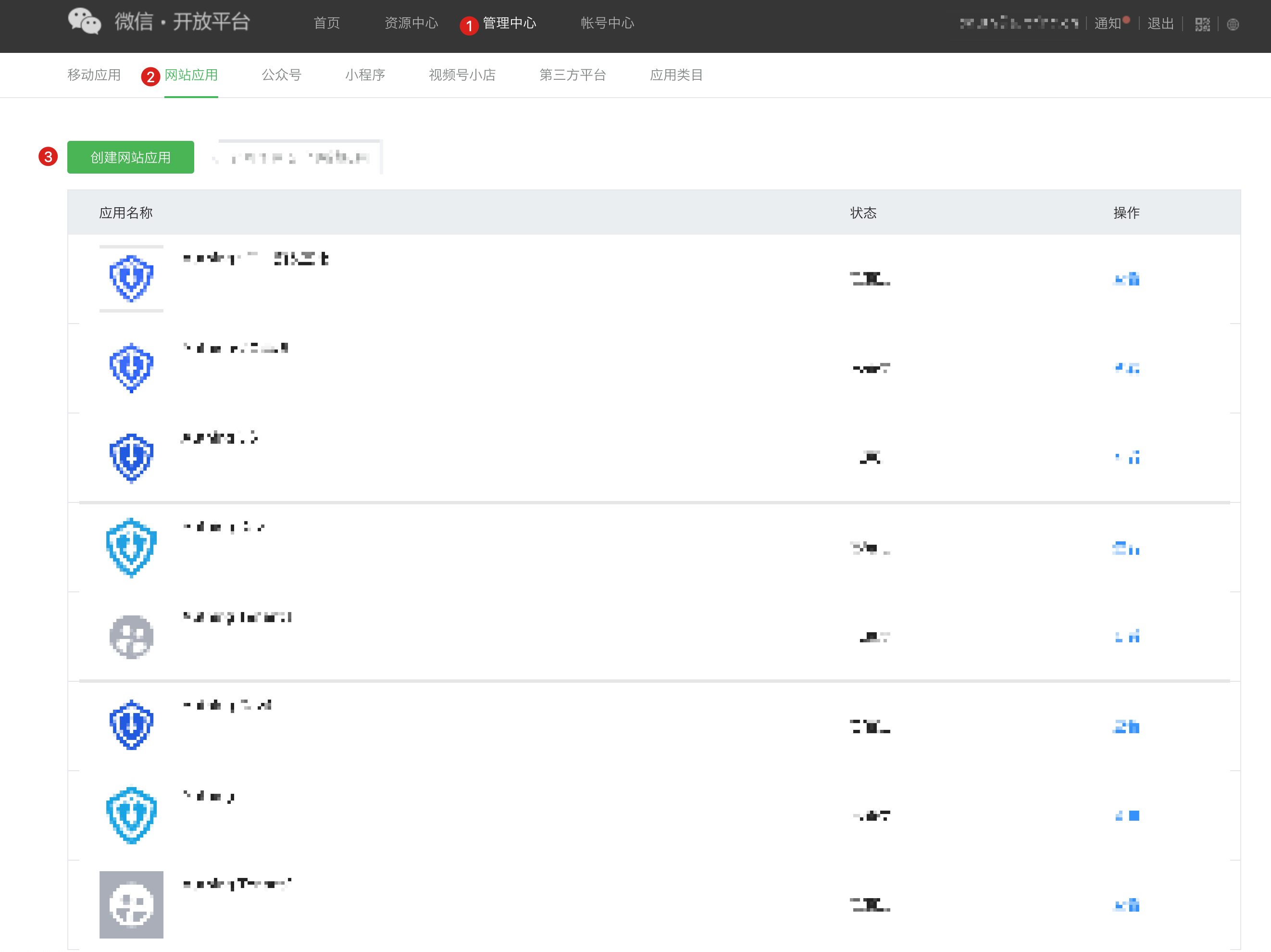
- Fill in "Fill in basic information", "Fill in website information", and "Submit successfully".
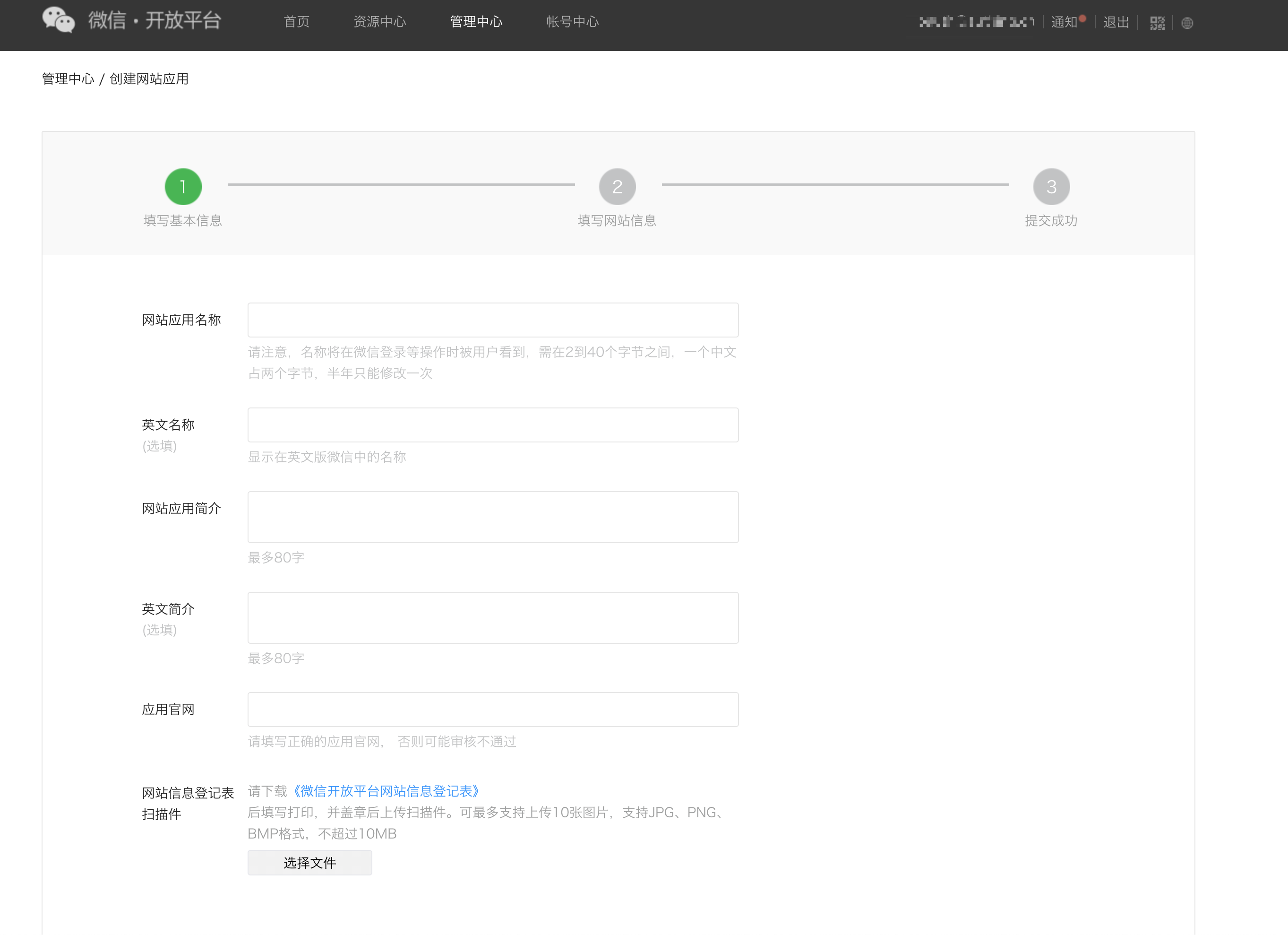
Step 2: Submit your website application for review
After completing the creation of the application, you need to submit the application to WeChat official for review. To ensure that it is easier to pass the review, please read and comply with WeChat's Application Review Specifications in advance.
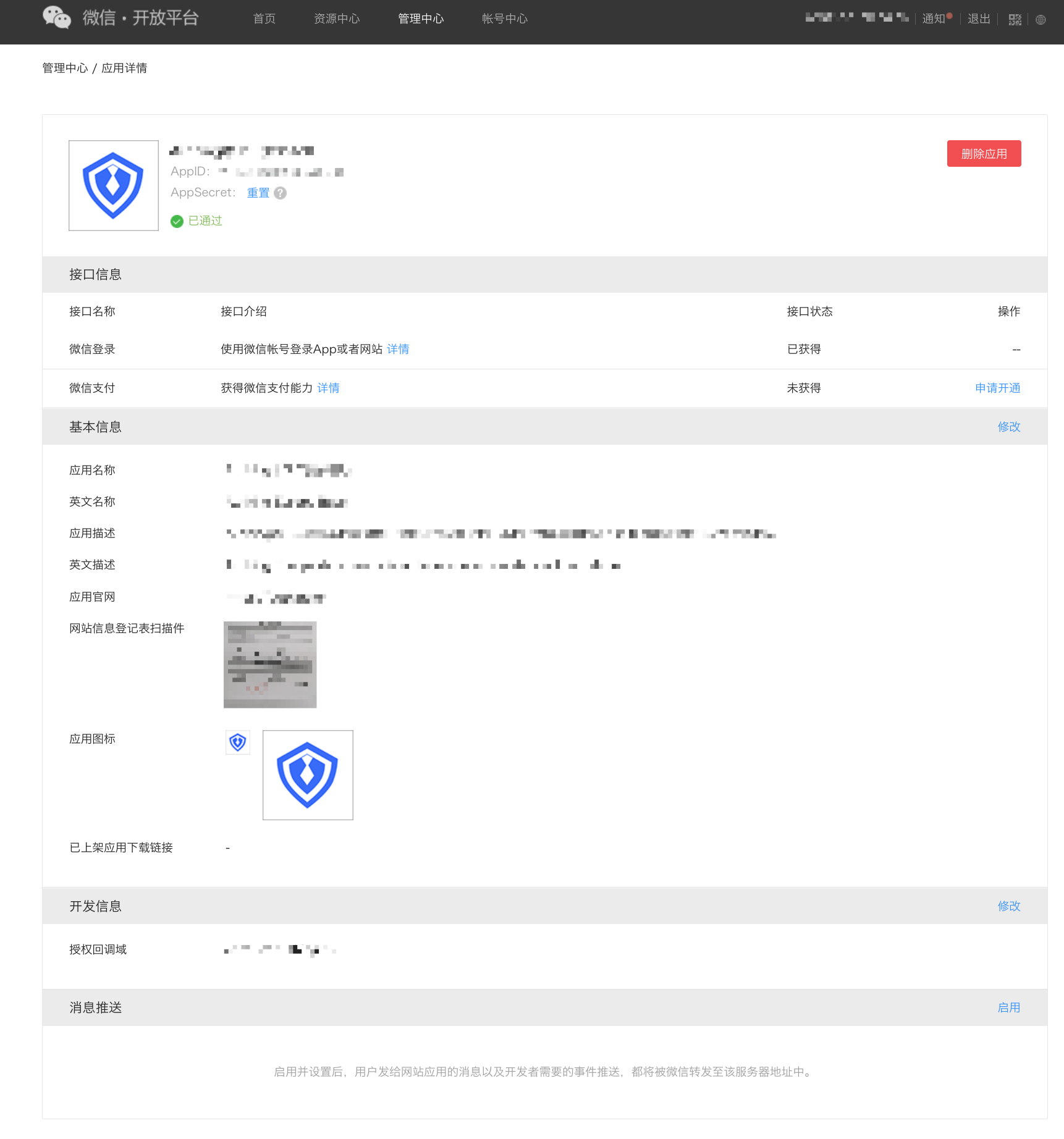
Step 3: Go online after WeChat official review
After waiting for WeChat official review to pass, when you open your WeChat website application, you will see an application with the status of "Reviewed", as shown in the figure below:
Implement WeChat login capability in GenAuth
Developer scenarios for using WeChat login
You want to implement the ability to log in to WeChat on the web by creating a WeChat application. According to the above steps, you have completed the creation of the WeChat application. Next, you don't have to read the massive and complicated WeChat documents anymore, but can directly implement WeChat login for your application through GenAuth "zero code" method.
Choose the right WeChat login method
In the "web application" development scenario, GenAuth supports both WeChat login capabilities in the WeChat ecosystem:
PC WeChat QR code login
PC mini program QR code login
In addition, for web applications, GenAuth also supports WeChat public account QR code login. You first need to make corresponding configurations on the WeChat public platform. For details, please see When you use WeChat public account for development.
Configuration process
To configure WeChat login on the web, follow the process below:
Step 1: Integrate the application that needs to be configured with WeChat login in GenAuth
For how to integrate your application in GenAuth, please refer to Connect your application to GenAuth.
Step 2: Create WeChat login method in your GenAuth user pool
GenAuth supports 20+ third-party account login methods. You can view all identity sources supported by GenAuth in Connecting external identity sources (Identity Provider).
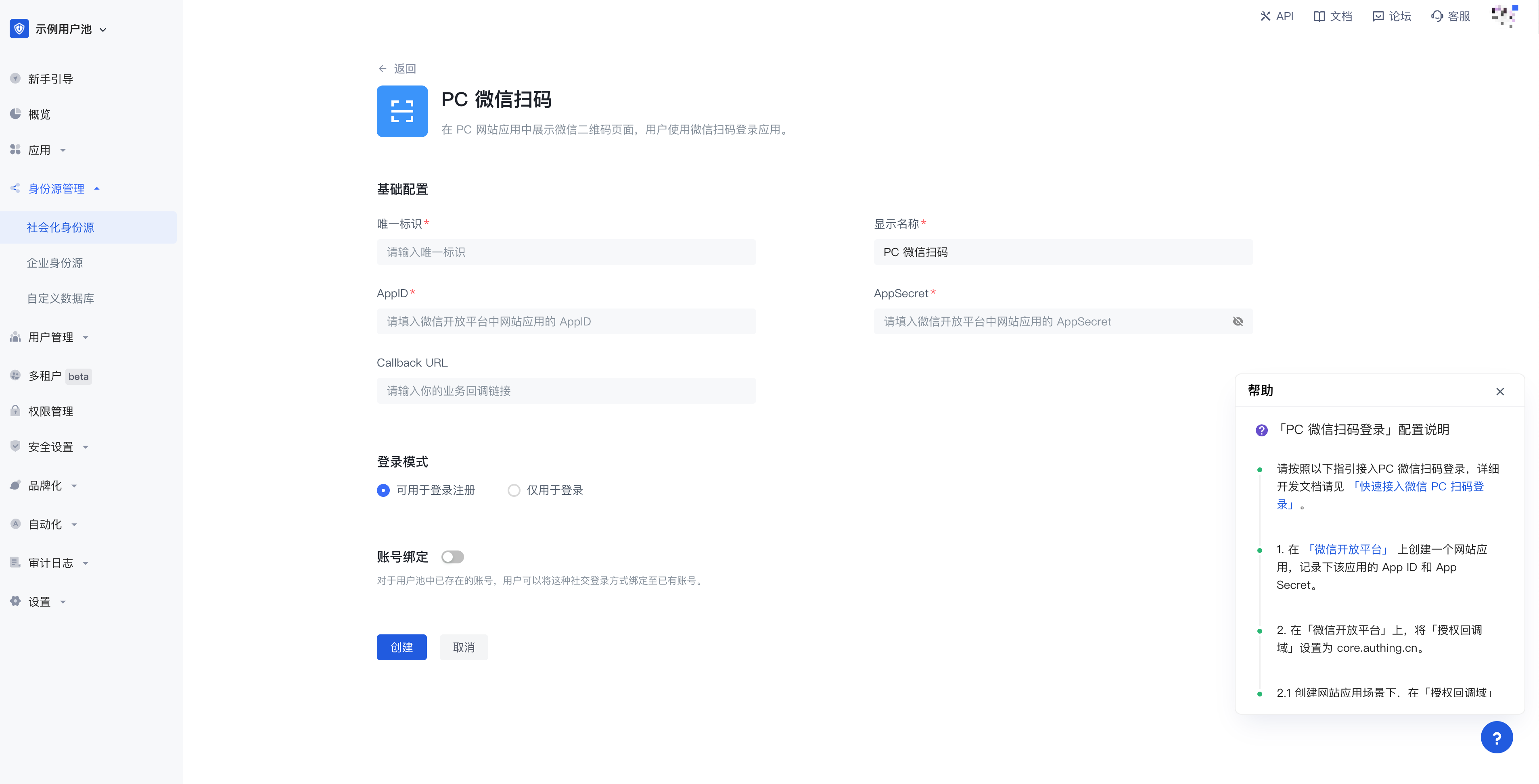
- Configure PC WeChat scan code login:PC WeChat scan code login allows your users to log in to third-party applications or websites securely using WeChat identity. After enabling WeChat QR code scanning login in GenAuth, you can quickly obtain WeChat user basic open information and help users realize basic open functions through GenAuth. For the configuration process, see PC WeChat QR code scanning.
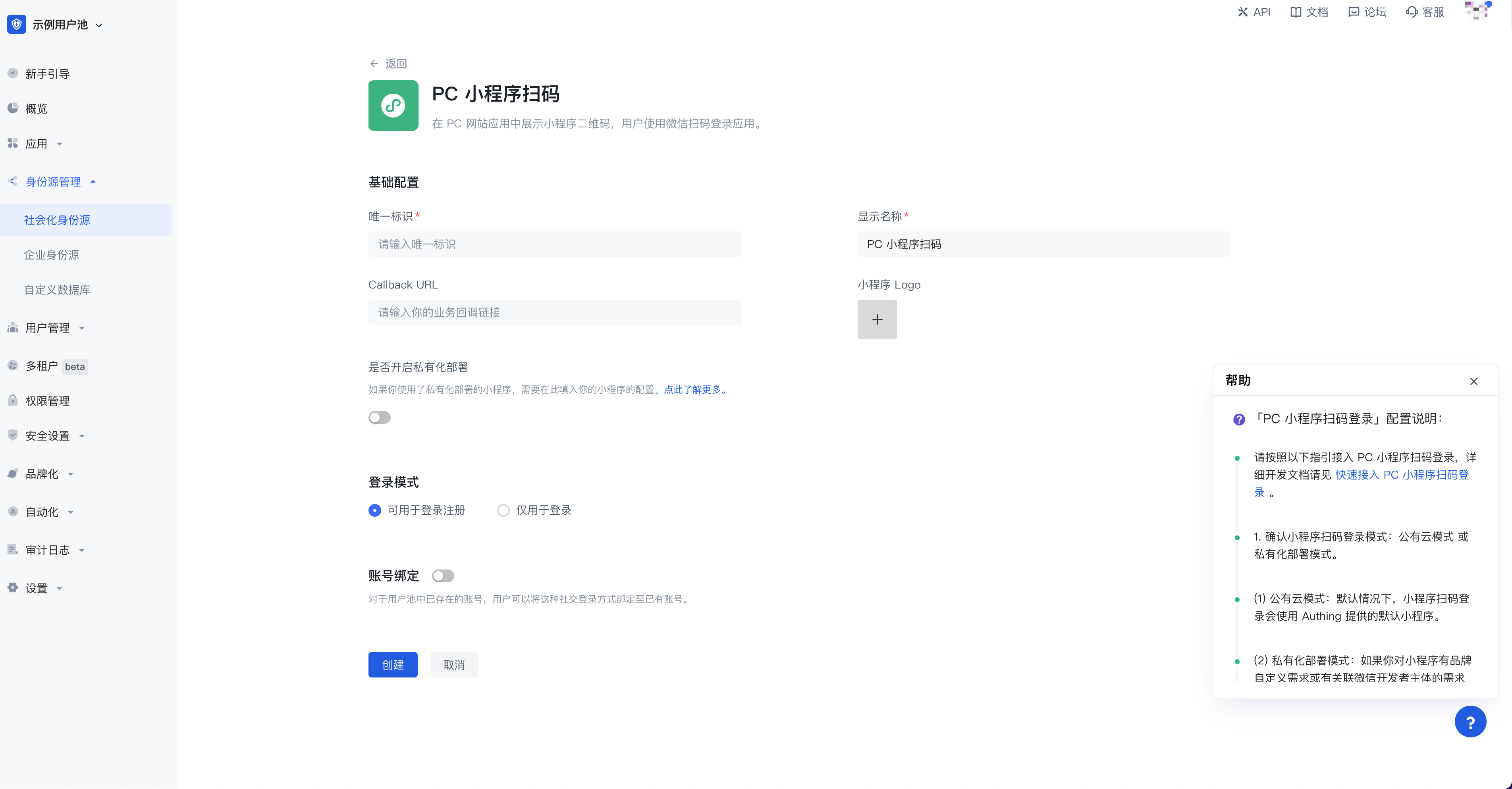
- Configure PC mini program QR code scanning login:This is a groundbreaking design of GenAuth. After enabling scanning mini program QR code login in GenAuth, you can obtain WeChat official real-name user information. Users can complete registration or login with real numbers with one-click authorization, and establish an account system based on mobile phone numbers for developers. For the configuration process, please refer to WeChat PC Mini Program Scan Code.
Step 3: Enable the WeChat login method you configured for the integrated GenAuth application
After completing the third-party login configuration, enable the corresponding login method in the application you have integrated:
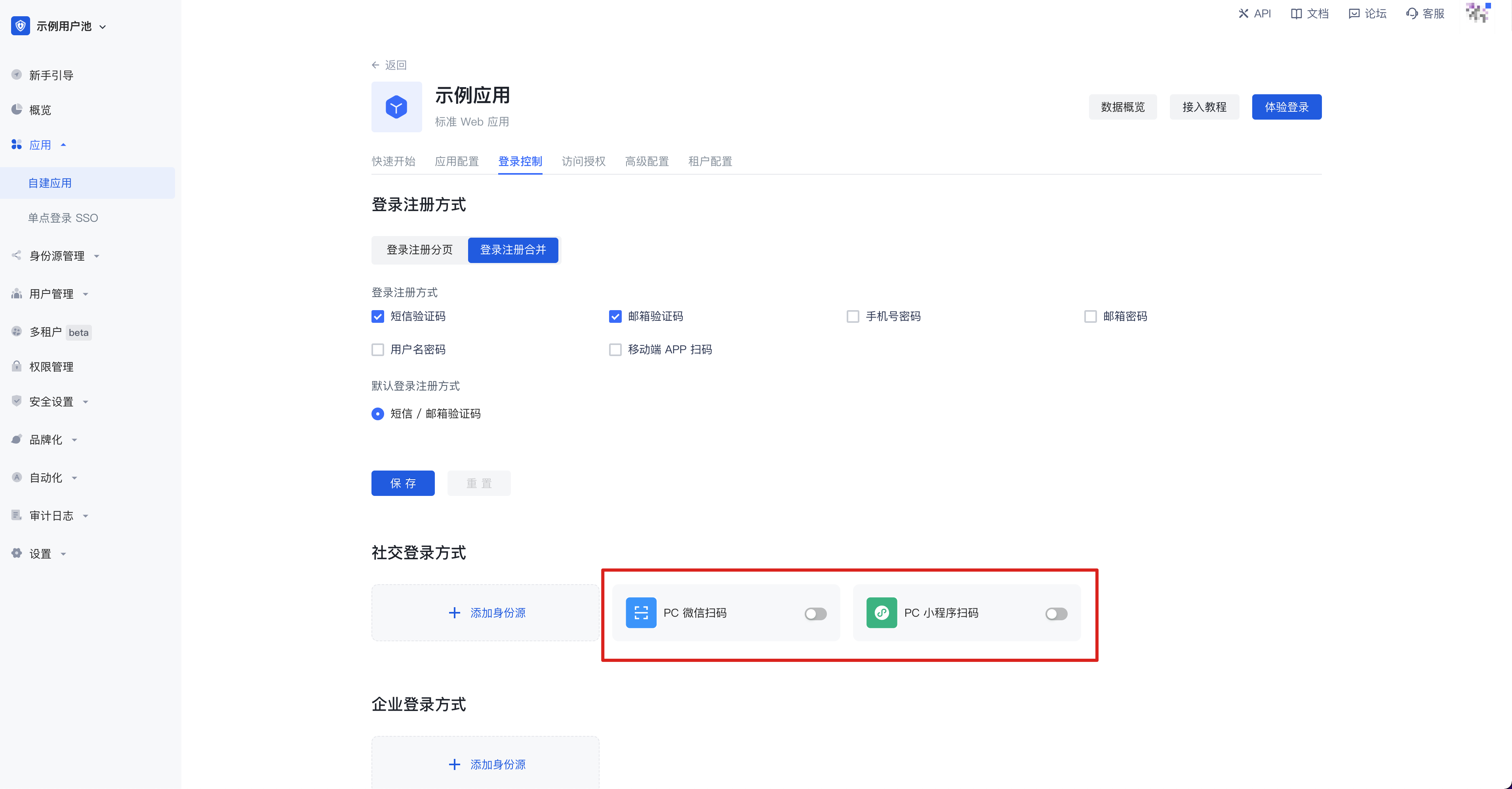
Congratulations! You have completed the WeChat login configuration. Now you can experience the WeChat login you implemented in the "Experience Login" of the application!
Daily Account Management of WeChat Application
User accounts on the WeChat platform use OpenID and UnionID as unique identifiers. Since WeChat did not require all applications to join the WeChat Open Platform in the early years, some accounts do not have Unionid. Later WeChat regulations require that all applications must rely on the WeChat Open Platform. Users who log in to these applications created by the WeChat Open Platform have both OpenID and UnionID unique identifiers. For the difference between the two, please refer to Introduction to WeChat Ecosystem Account System.
Based on the WeChat account system, there are two scenarios when your users log in through WeChat:
New users log in through WeChat
Old users log in through WeChat
For different scenarios of new and old users logging in, GenAuth supports the "account binding" function to ensure the uniqueness of your users' accounts in GenAuth.
For an introduction to the "account binding" function and usage details, please refer to account binding.
Other notes
When your application on WeChat Open Platform has been offline or disabled, the application you integrated in GenAuth will no longer be able to log in using WeChat.
When you use WeChat official account for development
WeChat Open Platform preparation
Register WeChat Open Platform account
Before developing WeChat ecosystem applications, you must first register as a developer of WeChat Open Platform. If you do not have a WeChat Open Platform account, please go to register.
Apply for developer qualification certification
After completing the WeChat Open Platform account registration, you need to fill in the developer qualification certification application in Account Center and wait for the certification to pass.
Launch your WeChat public account
Step 1: Create a WeChat public account
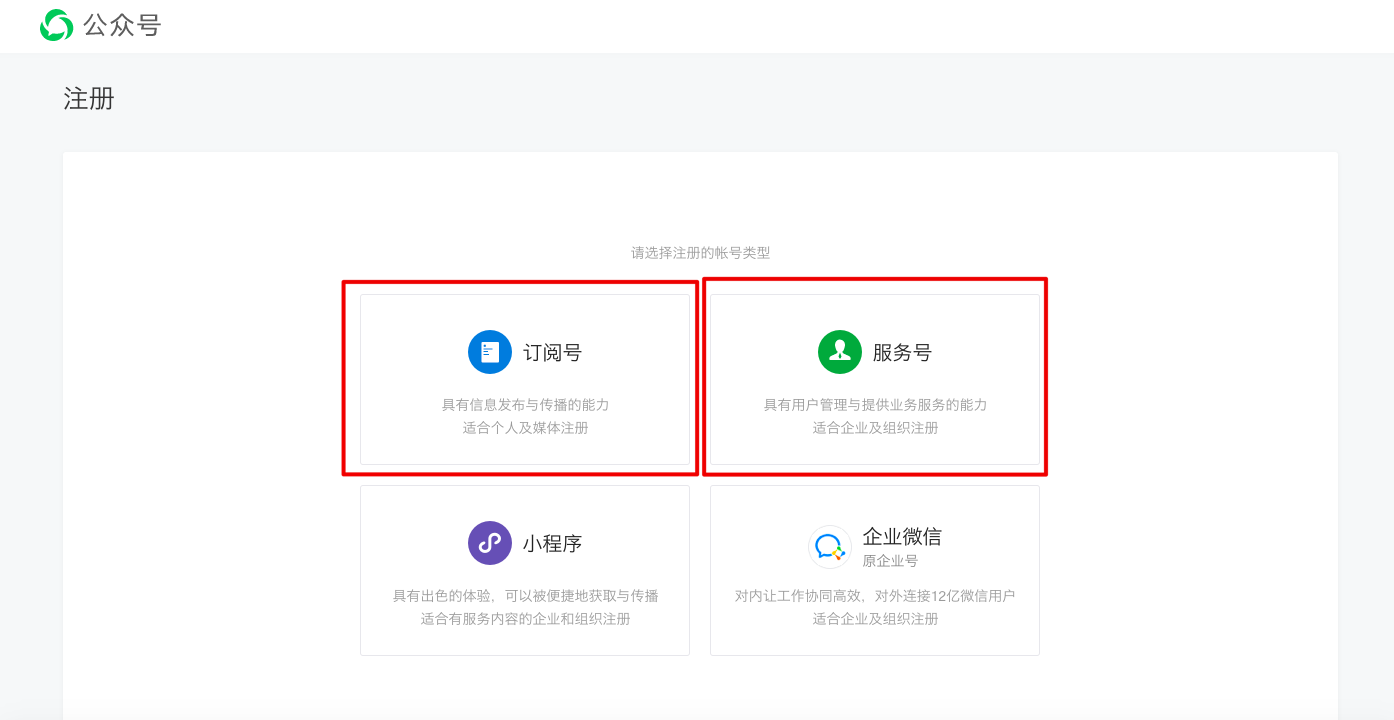
- Before creating a public account, you need to register an account on the WeChat public platform and select the type as Subscription account / Service account.
- Fill in "Basic Information", "Select Type", "Information Registration", and "Public Account Information" in turn to complete the registration.
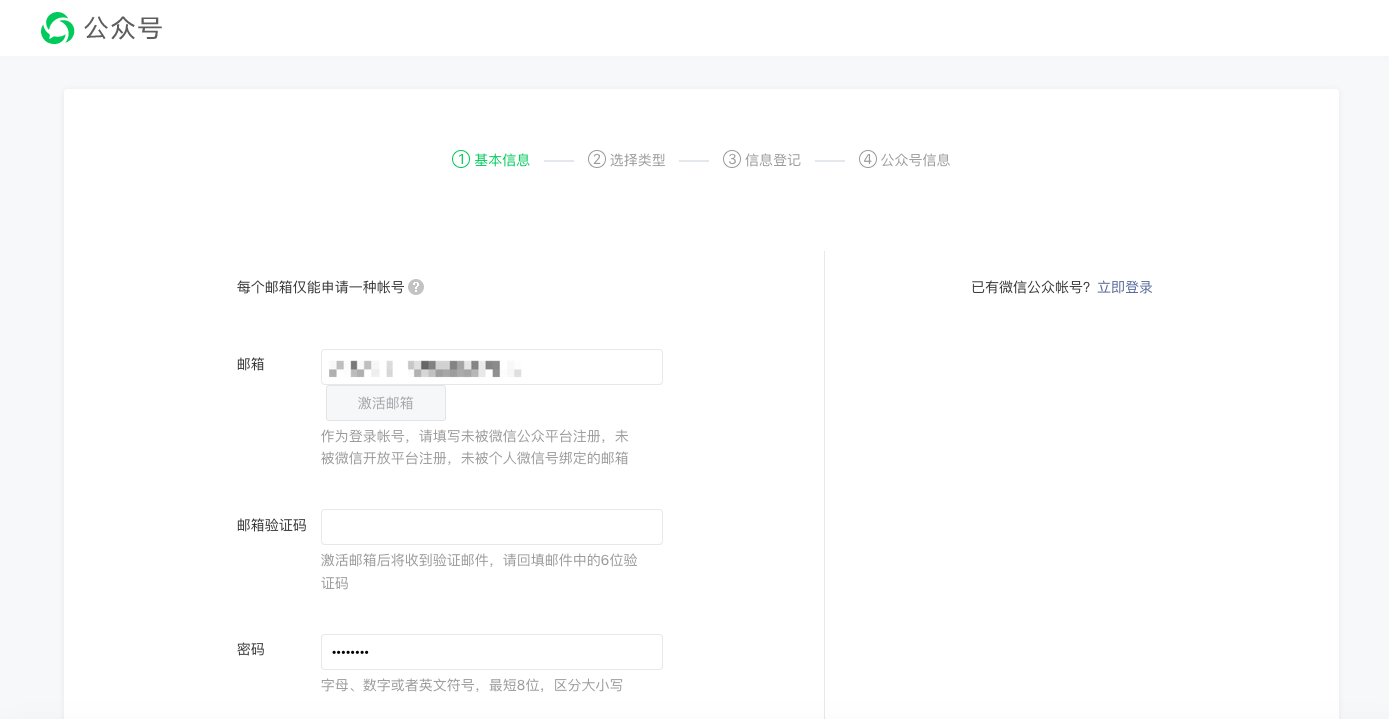
- After successful registration, the public account is created successfully.
Step 2: Bind WeChat public account
After creating a public account, you need to bind the public account on the WeChat Open Platform to ensure that you have a unique UnionID when logging into different applications under the same WeChat Open Platform account.
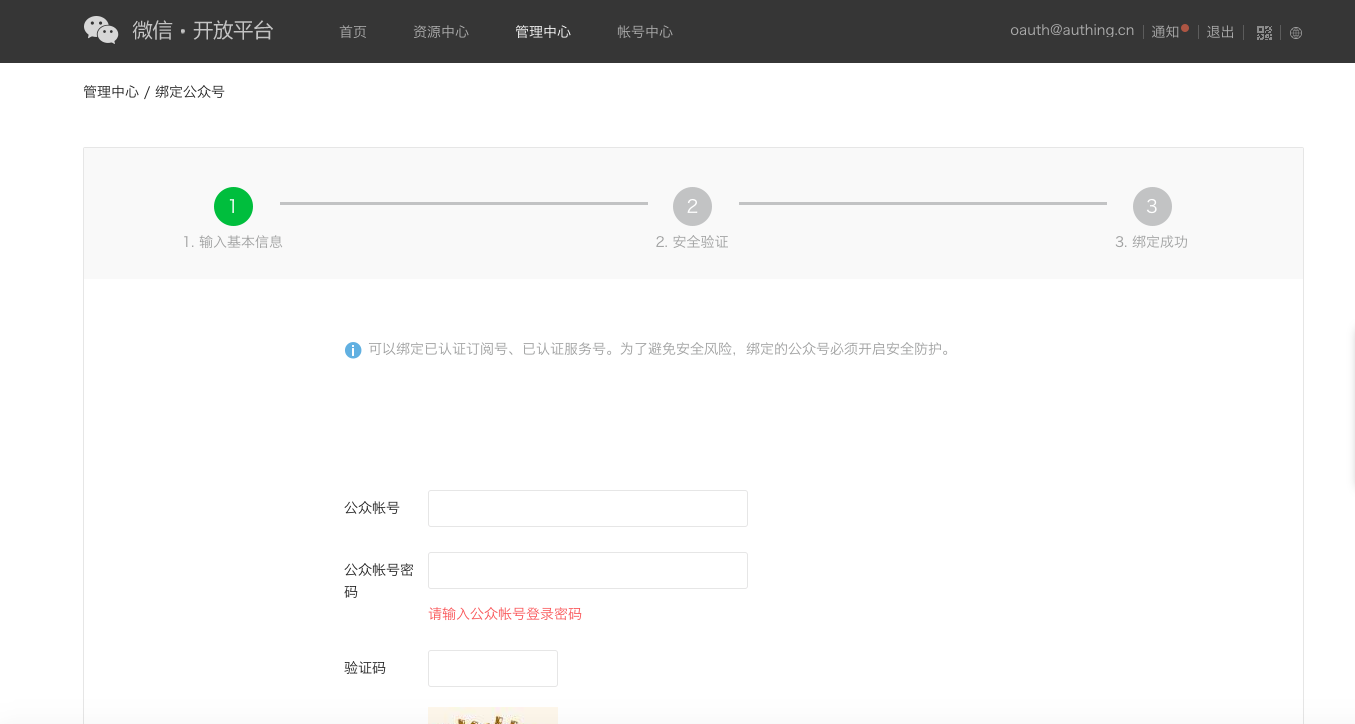
- After logging in to your WeChat Open Platform, click Bind Public Account under Admin Center->Public Account.
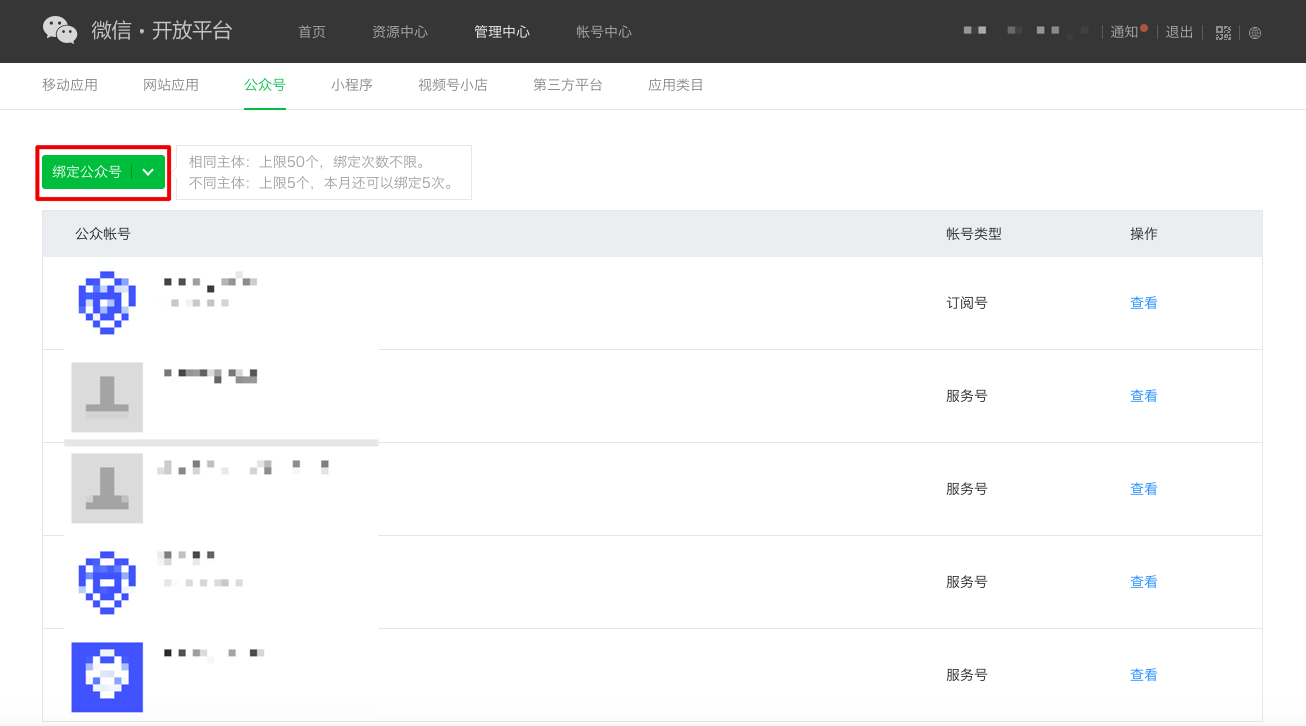
- Complete "Enter basic information", "Security verification", and "Bind successfully" in sequence.
Implement WeChat login capability in GenAuth
Developer scenarios using WeChat login
You want to implement the WeChat login capability on the web by creating a WeChat application. According to the above steps, you have completed the creation of the WeChat application. Next, you don't have to read a lot of complicated WeChat documents, but can directly implement WeChat login for your application through GenAuth "zero code" method.
Choose the appropriate WeChat login method
In the development scenario of "WeChat public account", GenAuth supports WeChat public account follow login capability.
Configuration process
To configure WeChat official account login, follow the process below:
Step 1: Integrate the application that needs to configure WeChat login in GenAuth
Currently, only web applications support WeChat official account login. Please refer to Connect your application to GenAuth.
Step 2: Create WeChat login in your GenAuth user pool
GenAuth supports 20+ third-party account login methods. You can view all identity sources supported by GenAuth in Connecting external identity sources (Identity Provider).
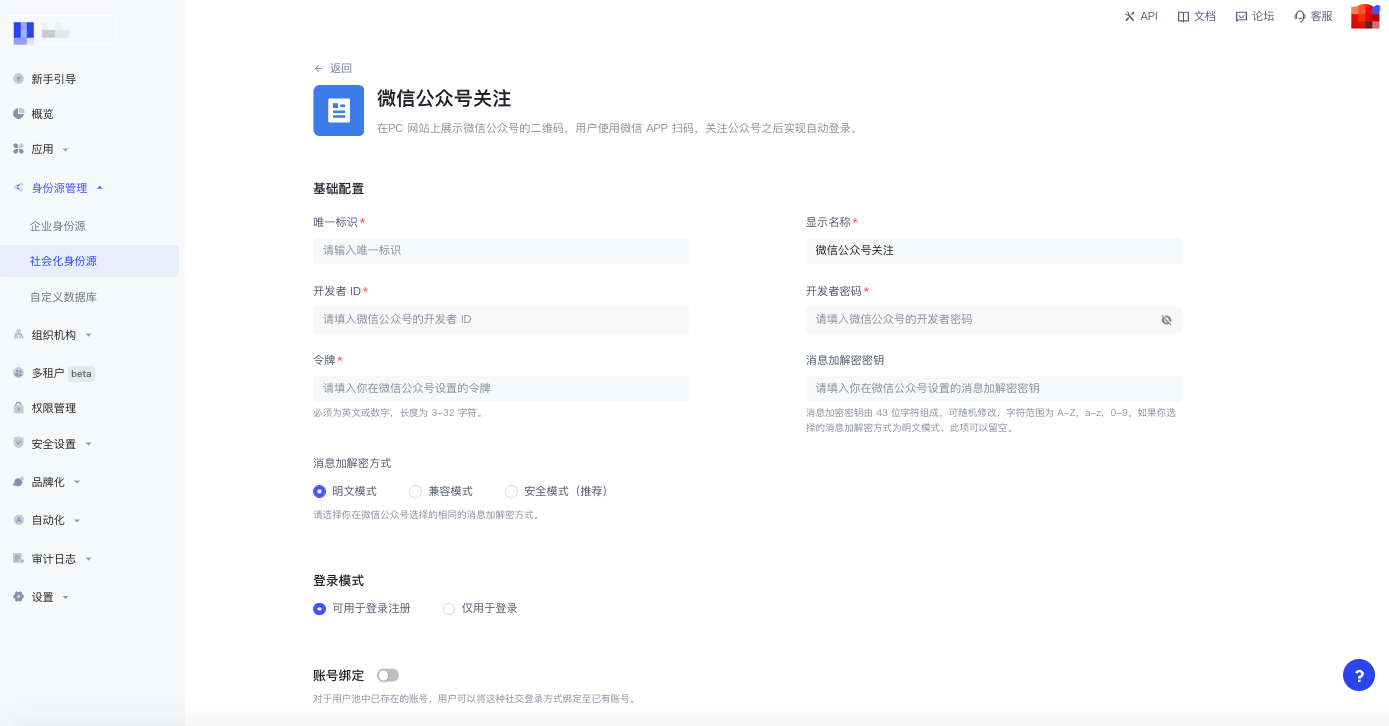
Configure WeChat official account follow login:
WeChat official account login allows your users to use WeChat identity to securely log in to the mini program. Display the WeChat public account QR code on the PC website, scan the code with WeChat APP, and follow the public account to achieve automatic login. For the configuration process, see WeChat public account follow.
Step 3: Enable the WeChat login method you configured for the integrated GenAuth application
After completing the third-party login configuration, enable the corresponding login method in the application you have integrated:
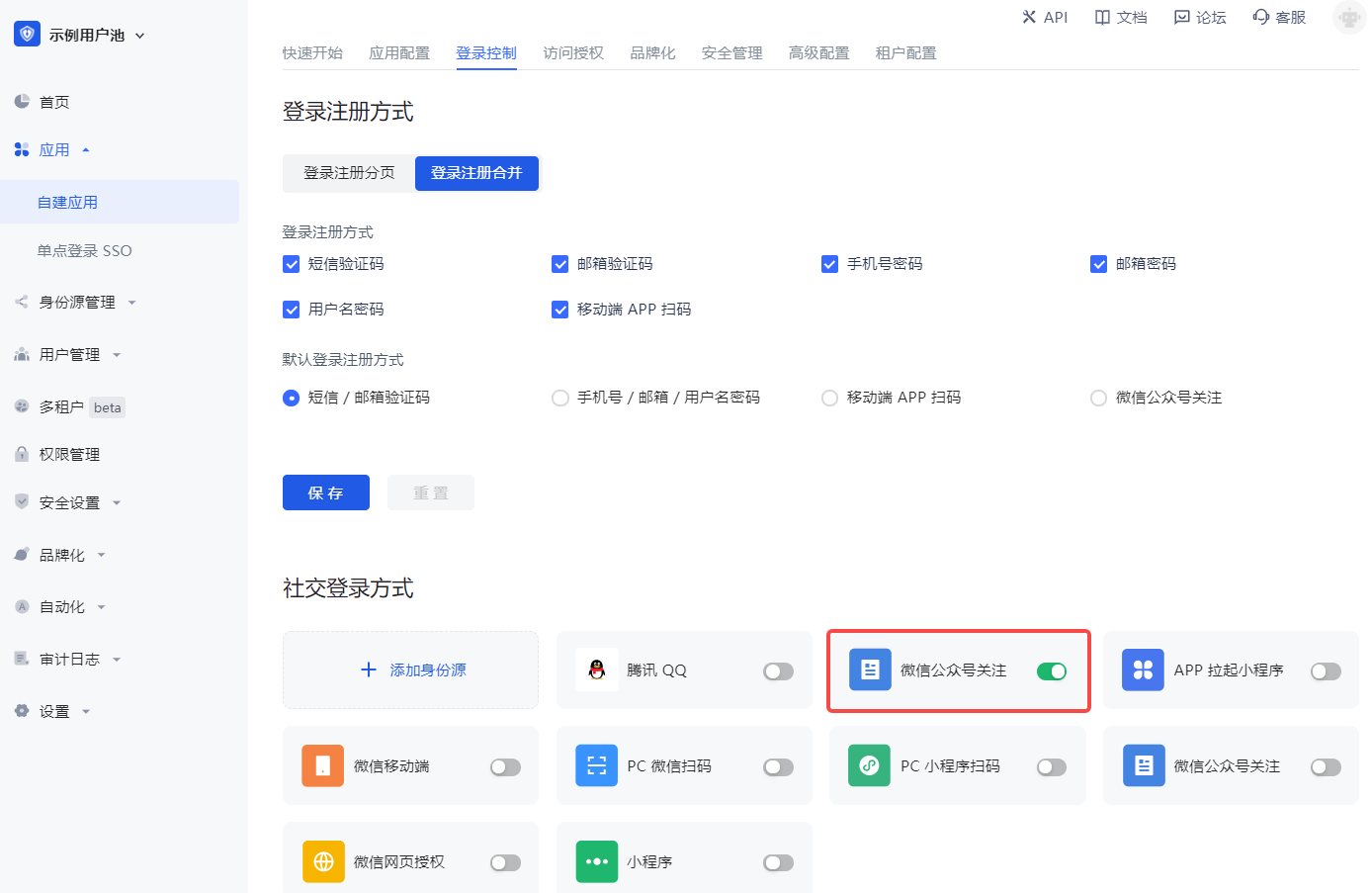
Congratulations! You have completed the WeChat login configuration. Now you can experience the WeChat login you implemented in the "Experience Login" of the application!
Daily account management of WeChat applications
User accounts on the WeChat platform use OpenID and UnionID as unique identifiers. Since WeChat did not require all applications to join the WeChat Open Platform in the early years, some accounts did not have Unionid. Later WeChat regulations required that all applications must rely on the WeChat Open Platform. Users who log in to these applications created by the WeChat Open Platform have both OpenID and UnionID as unique identifiers. For the difference between the two, please refer to Introduction to WeChat Ecosystem Account System.
Based on the WeChat account system, there are two scenarios when your users log in through WeChat:
New users log in through WeChat
Old users log in through WeChat
For different scenarios of new and old users logging in, GenAuth supports the "account binding" function to ensure the uniqueness of your users' accounts in GenAuth.
For an introduction to the "Account Binding" function and usage details, please refer to Account Binding.
Other Notes
When your application on WeChat Open Platform has been offline or disabled, the application you integrated in GenAuth will no longer be able to log in using WeChat.
When you use WeChat Mini Programs for development
WeChat Open Platform preparation
Register a WeChat Open Platform account
Before developing WeChat ecosystem applications, you must first register as a developer of the WeChat Open Platform. If you do not have a WeChat Open Platform account, please go to register.
Apply for developer qualification certification
After completing the WeChat Open Platform account registration, you need to fill out the developer qualification certification application in the Account Center and wait for the certification to pass.
Launch your mini program
Step 1: Create a mini program
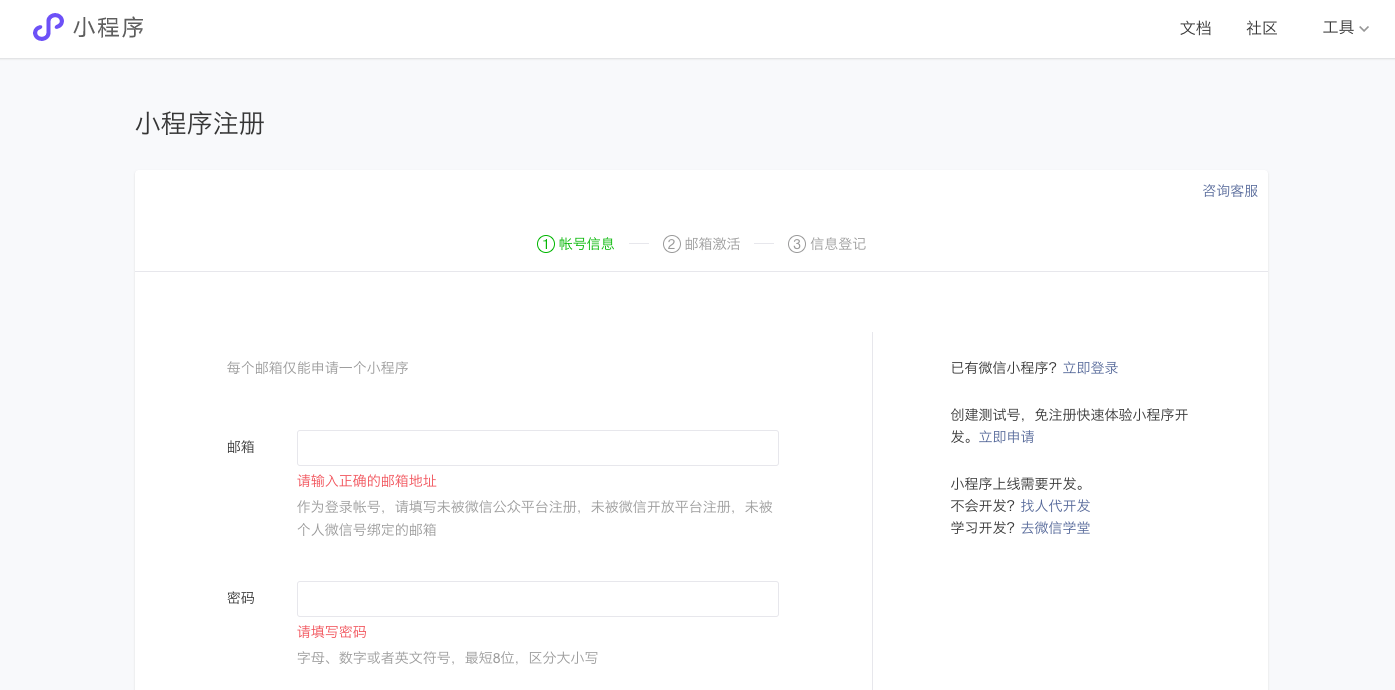
- Before creating a mini program, you need to register an account on the WeChat public platform and select the type as Mini Program.
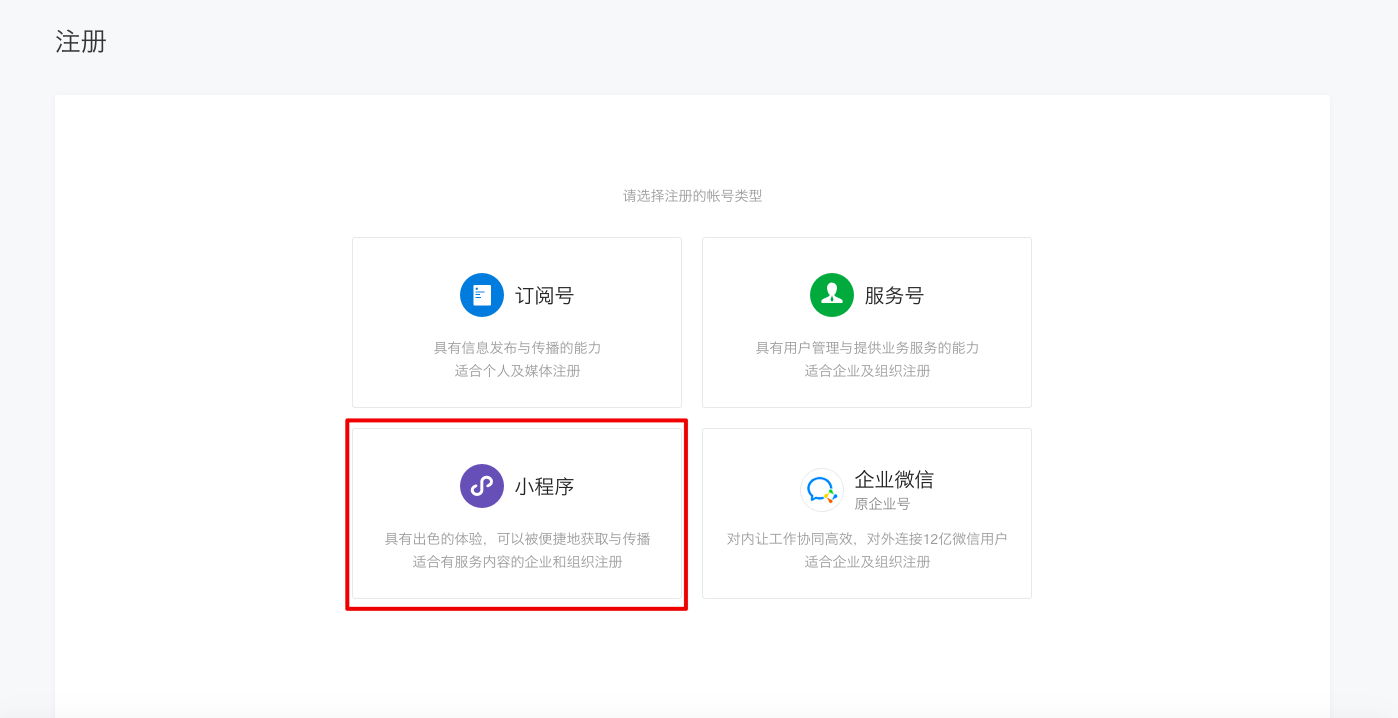
- Fill in "Account Information", "Email Activation" and "Information Registration" in turn to complete the registration.
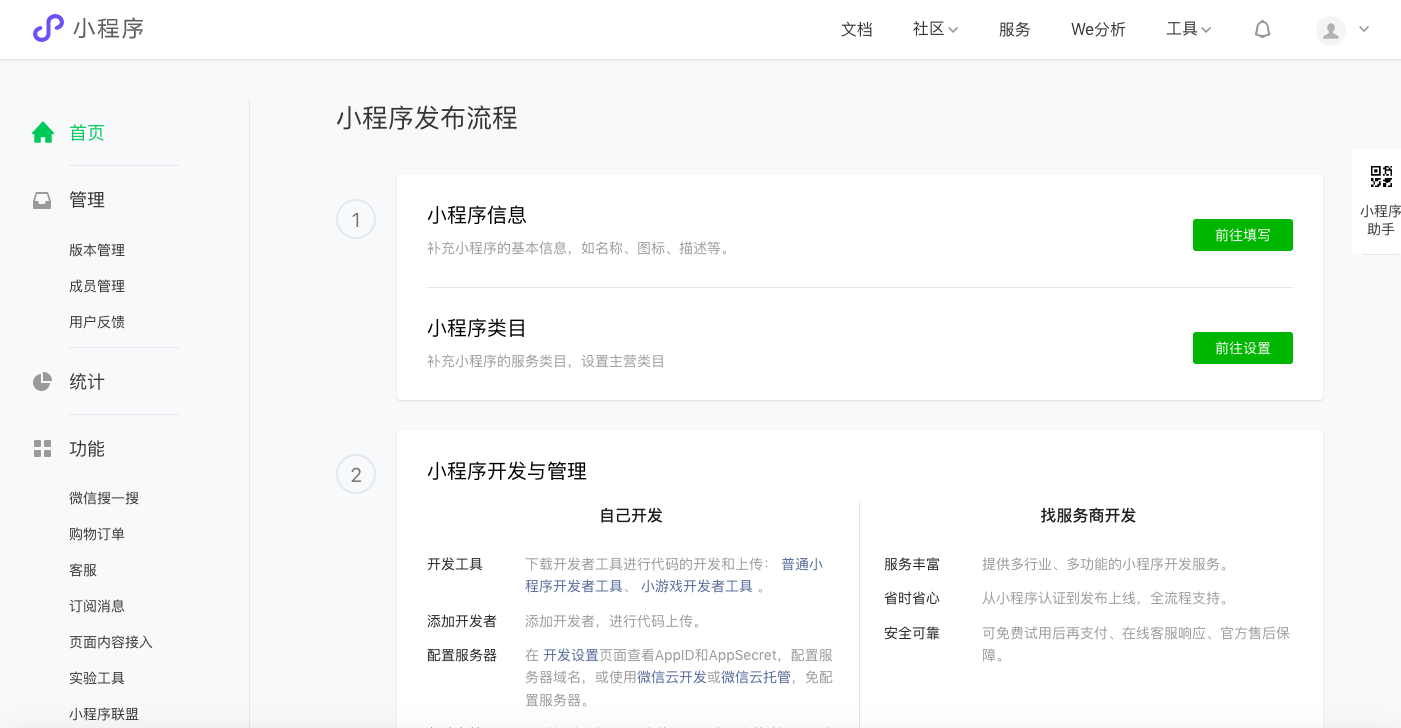
- After successful registration, the mini program account is created successfully. You can configure the mini program information on the WeChat public platform to complete the release.
INFO
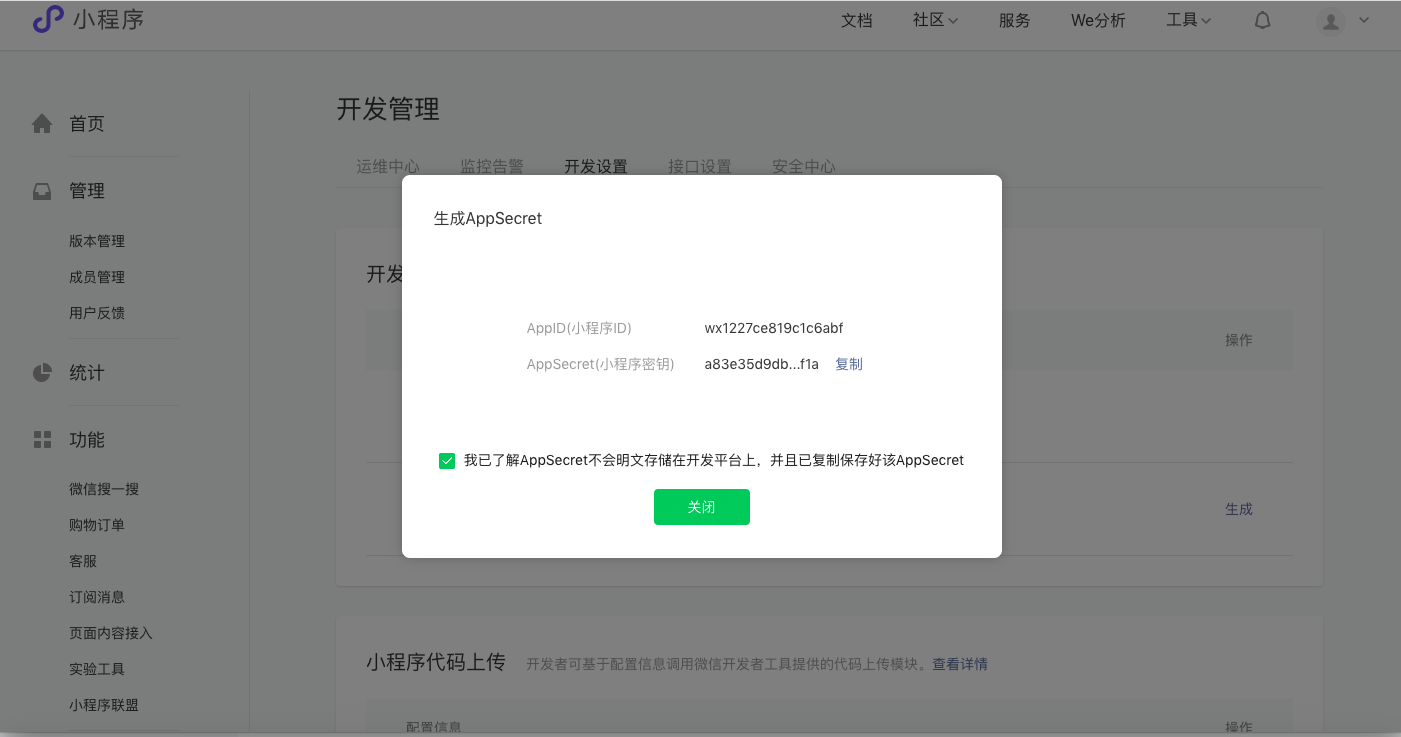
You can see AppID and AppSecret on the Development Management->Development Settings page, which will be used to configure the mini program identity source in GenAuth later.
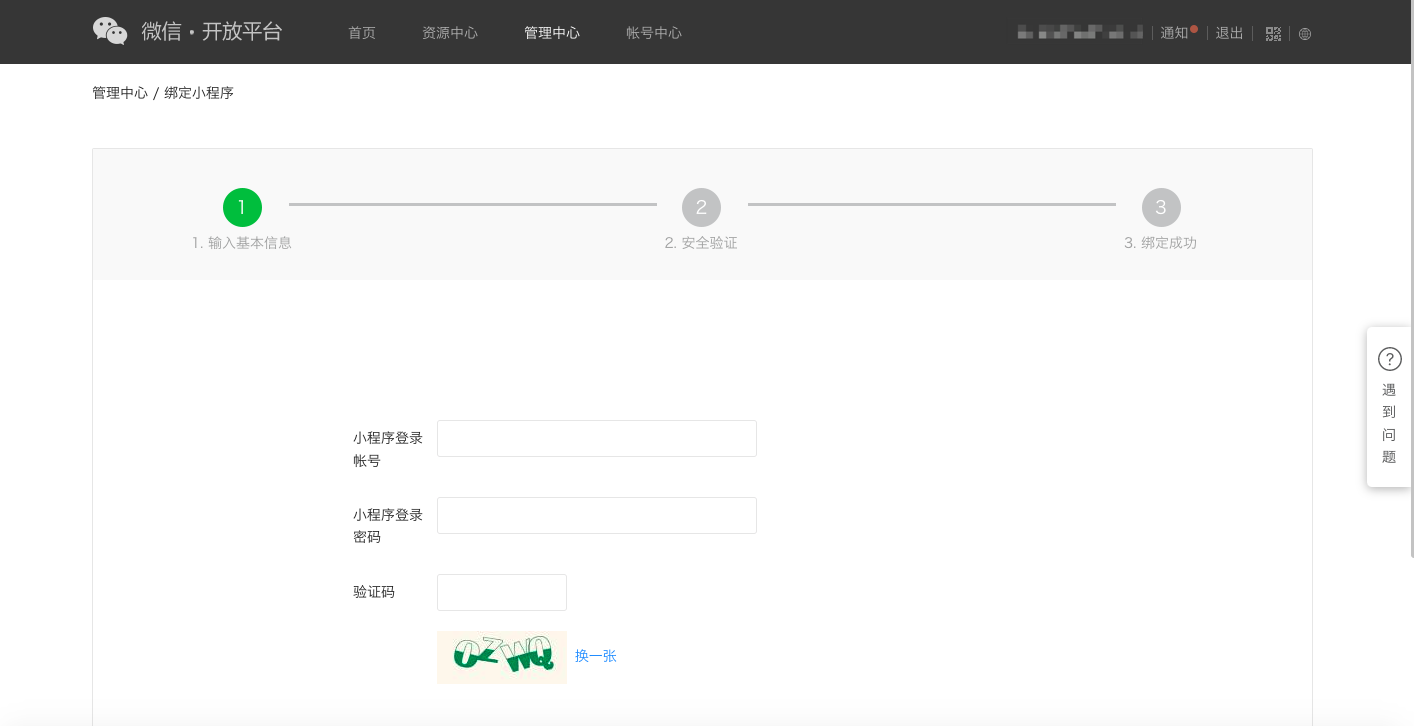
Step 2: Bind Mini Program
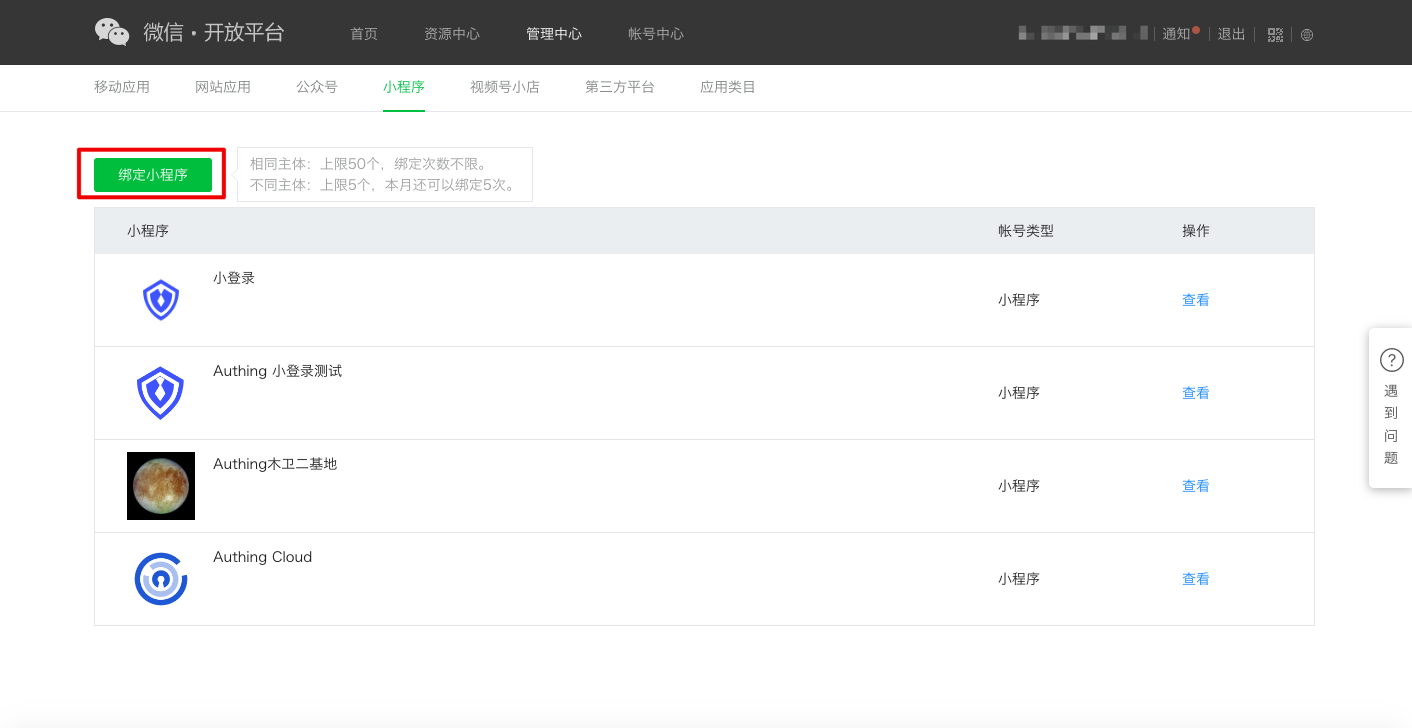
After creating a mini program, you need to bind the mini program in WeChat Open Platform to ensure that different applications logged in under the same WeChat Open Platform account have a unique UnionID.
- After logging in to your WeChat Open Platform, click Bind Mini Program under Admin Center->Mini Program.
- Complete "Enter basic information", "Security verification", and "Bind successfully" in sequence.
INFO
During "security verification", it is necessary to ensure that the mini program account:
- Passed WeChat qualification certification.
- Is not currently bound.
- The mini program corresponding to the account has set administrator information.
Verification can only be successful if the above conditions are met.
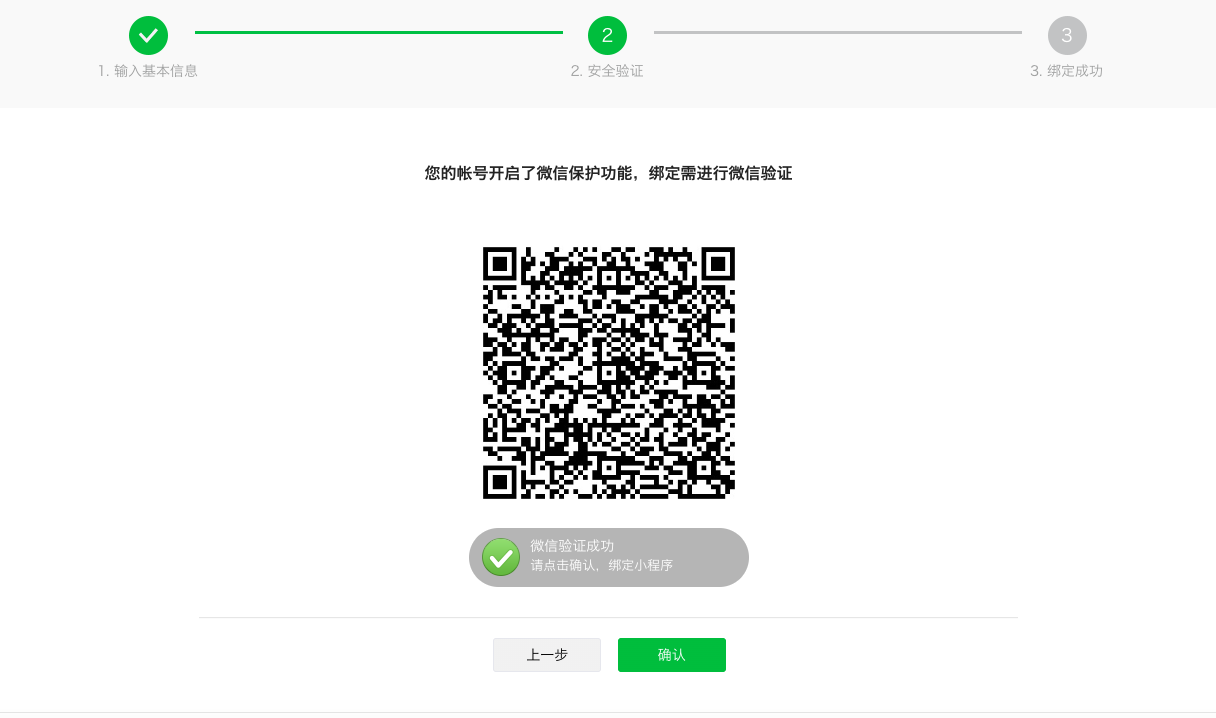
INFO
Mini program verification is successful
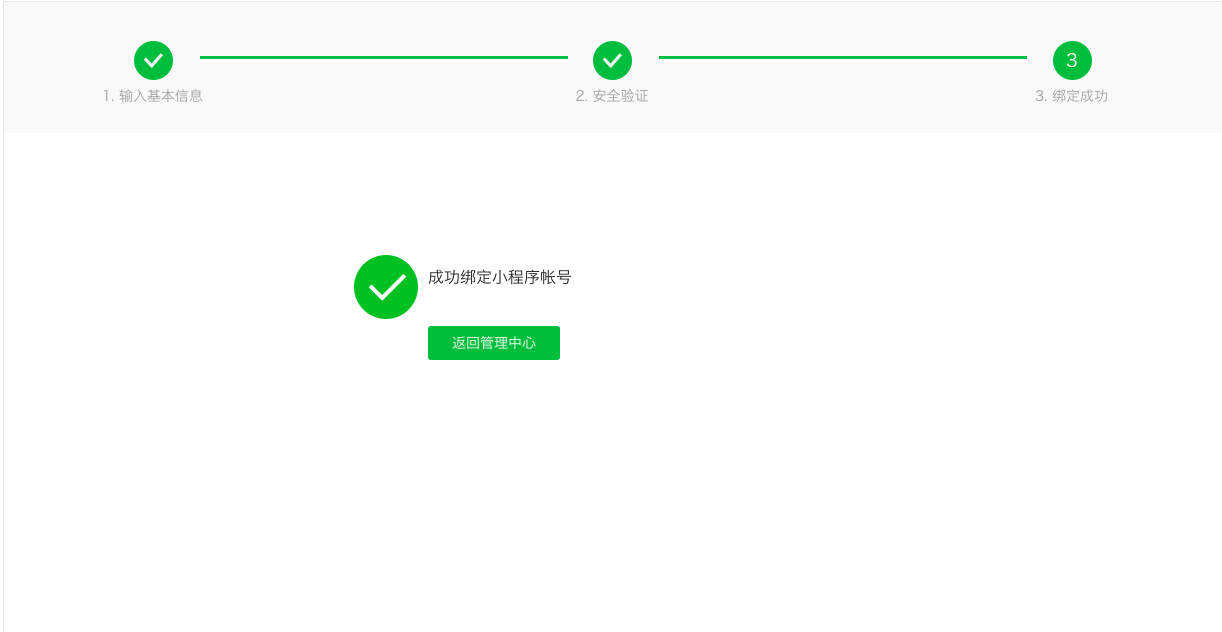
INFO
Mini program binding is successful
Implement WeChat login capability in GenAuth
Developer scenario using WeChat login
You want to implement the WeChat login capability on the web by creating a WeChat application. According to the above steps, you have completed the creation of the WeChat application. Next, you don’t have to read the massive and complicated WeChat documents anymore, but can directly implement WeChat login for your application through GenAuth "zero code" method.
Choose the right WeChat login method
In the "Mini Program" development scenario, GenAuth supports WeChat Mini Program login capabilities.
Configuration process
To configure the WeChat Mini Program login method, follow the following process:
Step 1: Integrate the mini program that needs to be configured with WeChat login in GenAuth
Currently, GenAuth does not support the creation of mini program type applications. It is currently not possible to integrate WeChat mini program applications in GenAuth. Please stay tuned.
Step 2: Create WeChat login method in your GenAuth user pool
GenAuth supports 20+ third-party account login methods. You can view all the identity sources supported by GenAuth in Connecting to an External Identity Provider.
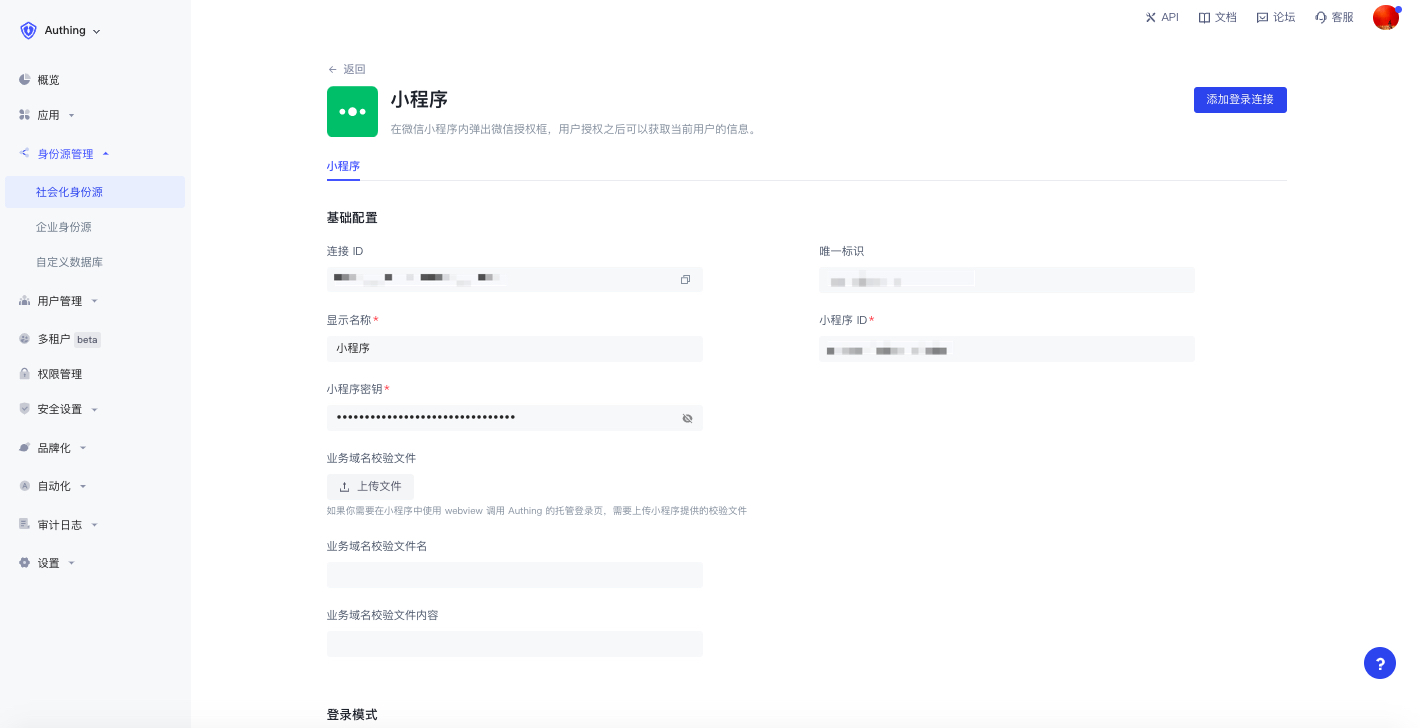
Configure Mini Program Login:
Mini Program Login allows your users to log in to Mini Programs securely using their WeChat identities. After enabling Mini Program Login in GenAuth, users can use the Mini Program login in WeChat to call up the authorization pop-up window to obtain WeChat user information. For more information about the configuration process, see WeChat Mini Program SDK.
Step 3: Enable the WeChat login method you configured for the integrated GenAuth application
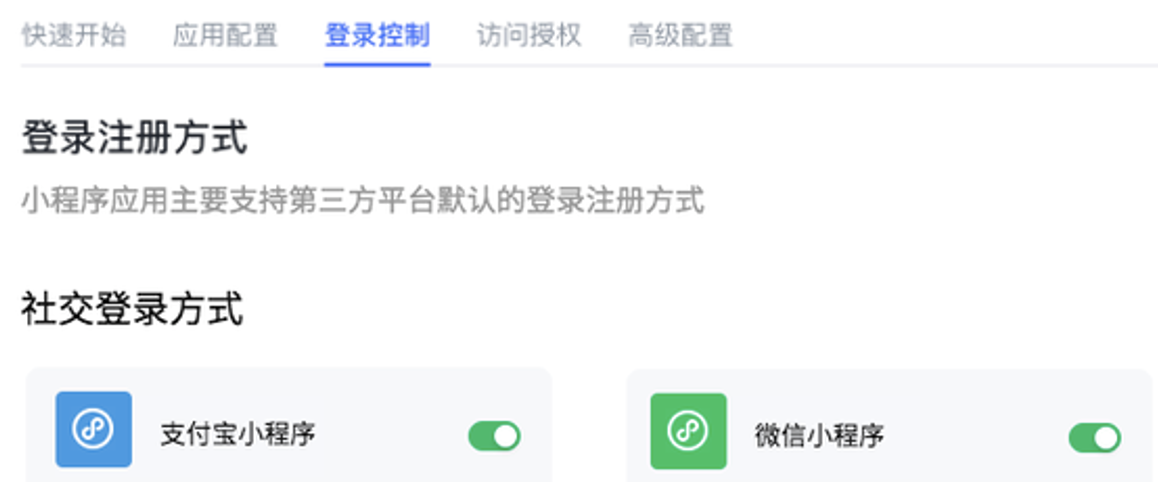
After completing the third-party login configuration, enable the corresponding login method in the application you have integrated (self-built application-> application details page-> login control-> social login method).
INFO
Note: The social login method of mini-program applications only displays the identity source of the mini-program class. This page can also be configured only after supporting mini-program applications.
The following is a schematic diagram:
Congratulations! You have completed the WeChat login configuration. Now you can experience the WeChat login you implemented in the "Experience Login" of the application!
Daily account management of WeChat applications
User accounts on the WeChat platform use OpenID and UnionID as unique identifiers. Since WeChat did not require all applications to join the WeChat Open Platform in the early years, some accounts did not have Unionid. Later WeChat regulations required that all applications must rely on the WeChat Open Platform. Users who log in to these applications created by the WeChat Open Platform have both OpenID and UnionID as unique identifiers. For the difference between the two, please refer to Introduction to WeChat Ecosystem Account System.
Based on the WeChat account system, there are two scenarios when your users log in through WeChat:
New users log in through WeChat
Old users log in through WeChat
For different scenarios of new and old users logging in, GenAuth supports the "account binding" function to ensure the uniqueness of your users' accounts in GenAuth.
For an introduction to the "Account Binding" function and usage details, please refer to Account Binding.
Other Notes
When your application on WeChat Open Platform has been offline or disabled, the application you integrated in GenAuth will no longer be able to log in using WeChat.