
Private deployment solution
description
GenAuth has provided identity authentication and user directory management solutions for many well-known companies at home and abroad, and can provide a variety of cloud environment deployment solutions for public cloud, private cloud and hybrid cloud. Among them, the private deployment solution can be deployed on the customer's intranet server, with encrypted data storage and exclusive cloud resources, which is safer, more stable and faster.
Advantages of private deployment
Data privacy and security
Data privatization isolation; disaster recovery backup mechanism; algorithm and key double insurance, data security and reliability; exclusive cloud resources, faster speed and better performance.
Enterprise autonomy
Enterprises can fully control themselves and easily implement member management, authentication configuration, and identity source management; user information and key information are stored locally.
High availability performance architecture
Supports high availability architecture and horizontal expansion, and can autonomously scale capacity based on your business scenarios.
Customizable
You can configure an independent secondary domain name, corporate logo, brand color, etc. for your IDaaS service to highlight the brand characteristics.
Private deployment service content
- Understand the business scenarios of the enterprise and customize exclusive solutions.
- Technical experts are responsible for the whole process, provide a complete deployment plan, and complete high-quality delivery.
- Efficient operation team use support, and after-sales service responds in time.
Supported platform
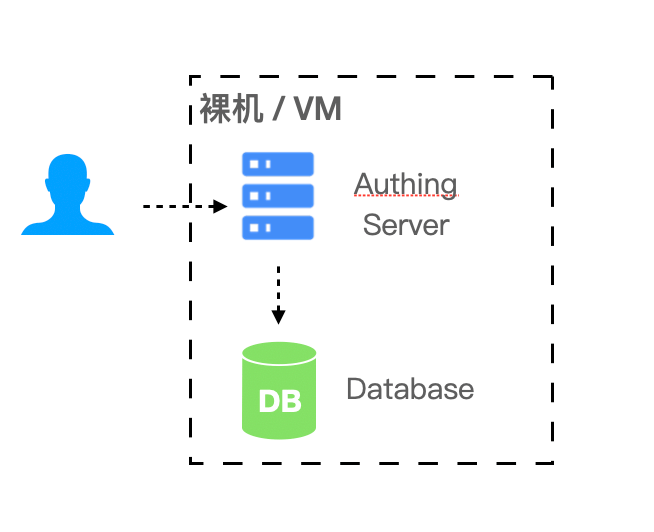
Bare metal or VM virtual machine
In simple (non-high availability) scenarios, bare metal or VM virtual machine can be used for deployment.
- Required environment: Windows or Linux operating system, Node.js version 12 and above.
- Recommended operating system: CentOS 7.2 and above Ubuntu 18.04 and above.
Docker Compose
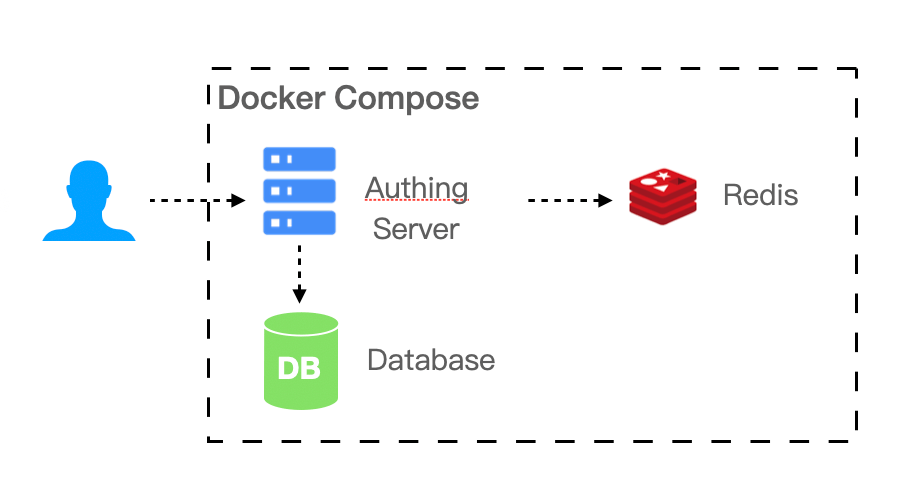
If your business scenario has a certain scale of 20 to 2000 users, the IDaaS platform needs multiple components to support your business scenario. You can use Docker Compose to simplify your deployment process.
- Required environment: Linux operating system, Docker 17.04.
- Recommended operating system: CentOS 7.2 and above Ubuntu 18.04 and above.
Kubernetes
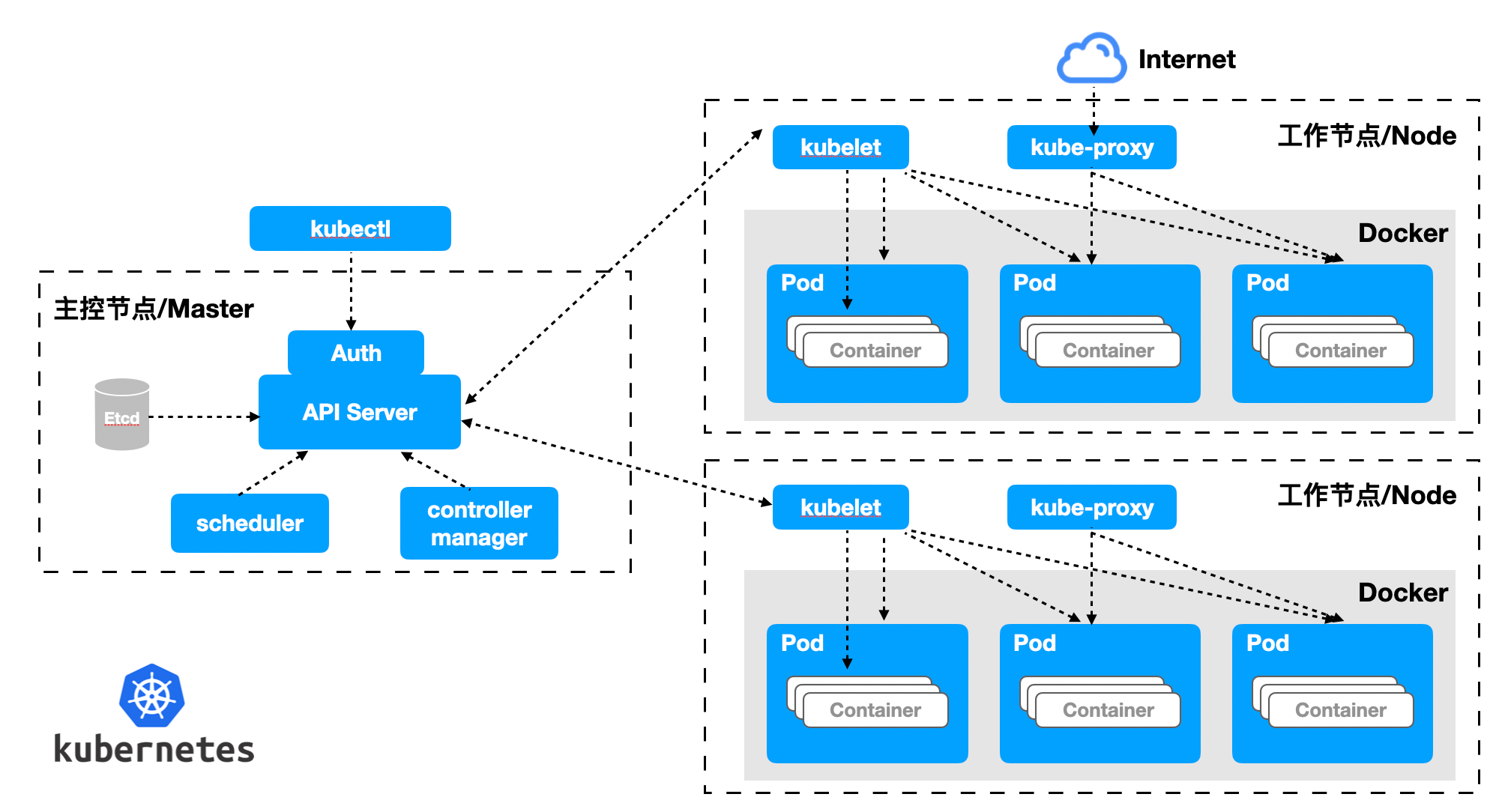
If your business scenario carries a large number of users, with a scale of 2000 or more, you need to consider performance and reliability when deploying privately. We recommend that you use the Kubernetes cloud-native model to operate and maintain your IDaaS platform.
- Required environment: Kubernetes 1.16 and above.
- Recommended operating system: CentOS 7.2 and above, Ubuntu 18.04 and above.
Resource Planning
| Number of people supported | Scenarios | Servers | Databases | Cache Redis | ElasticSearch |
|---|---|---|---|---|---|
| 20 people or less | Small teams and POCs | 4 cores 8G memory * 1 | - | - | - |
| 20 people - 2000 people | Small and medium-sized enterprise scenarios | 4 cores 16G memory * 1 | 2 cores 8G * 1 | 1 core 2G * 1 | 4 cores 8G * 1 + 500G storage |
| 2000 people - 20000 people | Large-scale enterprise scenarios | 4 cores 16G memory * 1 | 4 Core 16G * 1 | 1 Core 4G * 1 | 4 Core 8G * 1 + 500G Storage |
| More than 20,000 people | Large-scale enterprise scenarios | 4 Core 16G Memory * 3 | 8 Core 32G * 1 | 2 Core 8G * 1 | 8 Core 16G * 1 + 500G Storage |
Notes
- Servers can access each other through the intranet.
- Provide wildcard domain names (or single domain names if there are a small number) and corresponding certificates.
- Provide an intranet domain name resolution server, which needs to resolve both the intranet and the intranet domain names. Cluster deployment is recommended.
Basic deployment mode
Overview
Orchestration-based containerized deployment and operation and maintenance have gradually become the mainstream method. Whether it is based on Kubernetes or Docker infrastructure environment, business components can be quickly built through orchestration, and operation and maintenance management can also be efficient. Here we recommend that you use container-based deployment solutions.
Kubernetes deployment mode or Docker deployment solution
Of course, we also provide a traditional physical machine-based GenAuth deployment solution. The advantage of physical machine deployment is that it can make full use of physical machine resources and can finely control the deployment process.
This article describes the basic deployment solution of the GenAuth IDaaS platform and specific operation instructions.
Overall architecture
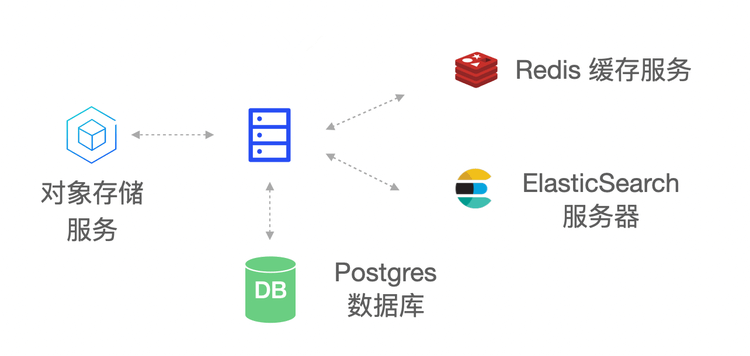
The main components of the GenAuth IDaaS platform architecture include: object storage service, Redis, ElasticSearch, Postgres and GenAuth Server. As the main service of the GenAuth IDaaS platform, GenAuth Server receives requests from clients; object storage is used as a service for storing static resources; Redis stores session information, data cache, etc.; Postgres is used to store core business data; ElasticSearch is used for data statistics analysis and log collection analysis.
Deployment plan
1. Component planning
| Server | Component package | Functional description |
|---|---|---|
| ElasticSearch | elasticsearch-7.7.0 | Search engine, log service |
| GenAuth Server | authing-server-1.2.0 | GenAuth main service |
| Redis | redis-4.0.0 | Cache service |
| PostgreSQL | postgres-12.5 | Database service |
| Logstash | logstash-7.7.0 | Log collection, analysis service |
| JDBC-River | jdbc-logstash-river:1.0.0 | Backend data service |
| Staticfiles | authing-staticfiles:1.0.0 | Static resource service |
2. System environment requirements
Server configuration:
| Project | Minimum configuration | Recommended configuration |
|---|---|---|
| CPU | X86 64-bit 8 cores | X86 64-bit 16 cores |
| Memory | 32 GB | 64 GB and above |
| Hard disk | 500 GB | 2 TB |
| Intranet bandwidth | 100 Mbps | 1 Gbps |
Operating system environment requirements:
| Project | Minimum configuration | Recommended configuration |
|---|---|---|
| Operating system platform | linux/amd64 | - |
| Kernel version | linux 3.10.0 and above | - |
3. Related documents
| Name | Description |
|---|---|
| 《GenAuth IDaaS Platform User Guide Version 1.2.0》 | Introduction GenAuth IDaaS Platform Operation Guide |
| 《GenAuth IDaaS Platform Product Documentation Version 1.2.0》 | Introducing the product features of the GenAuth IDaaS platform |
**Note: Please contact GenAuth pre-sales staff to obtain the above resources. **
4. Installation package
| Name | Description |
|---|---|
| authing-jdbc-logstash-river-1.0.0.tar.gz | GenAuth backend data service installation package |
| authing-server-1.2.0.tar.gz | GenAuth service installation package |
| authing-staticfiles-1.0.0.tar.gz | Static resource service installation package |
| elasticsearch-7.7.0-linux-x86_64.tar.gz | ElasticSearch service installation package |
| logstash-7.7.0-linux-x86_64.tar.gz | Logstash service installation package |
| postgres-12.5-linux-x86_64.tar.gz | PostgreSQL service installation package |
| redis-4.0.0-linux-x86_64.tar.gz | Redis service installation package |
**Note: Please contact GenAuth pre-sales staff to obtain the above resources. **
Docker deployment mode
Overview
Docker-Compose is a set of orchestration tools based on the Docker engine. You can use Docker-Compose to quickly deploy the GenAuth IDaaS platform with one click. GenAuth under the Docker deployment solution is a stand-alone environment deployment. If you want to deploy a high-availability version of GenAuth, please refer to: Kubernetes deployment mode
This article describes the deployment solution of the GenAuth IDaaS platform based on Docker-Compose and specific operation instructions.
Overall architecture
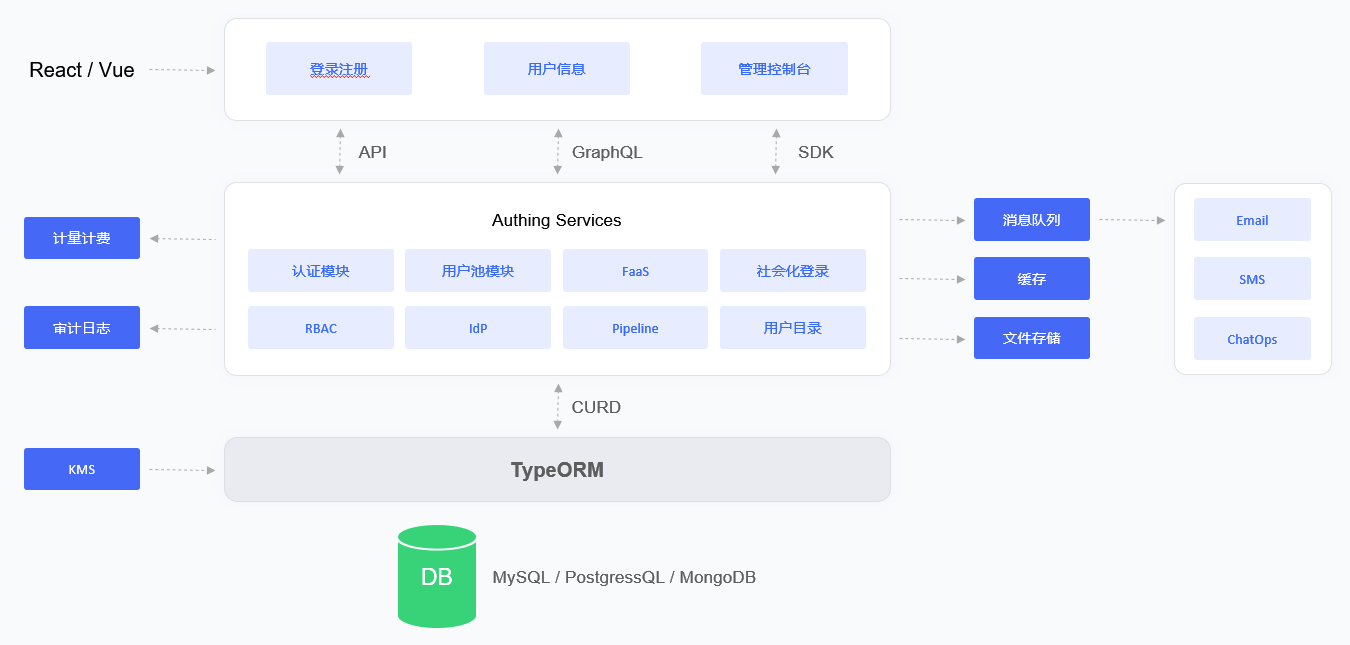
The main components in the GenAuth IDaaS platform architecture include: object storage service, Redis, ElasticSearch, Postgres and GenAuth Server. As the main service of the GenAuth IDaaS platform, GenAuth Server receives requests from clients; object storage is used as a service for storing static resources; Redis stores session information, data cache, etc.; Postgres is used to store core business data; ElasticSearch is used for data statistics analysis and log collection and analysis.
In terms of the log system, the GenAuth IDaaS platform uses the ELK architecture. GenAuth Server writes logs to the Log File, and Logstash writes log information to the ElasticSearch service by reading the Log File. This ensures that multiple IDaaS clusters follow a unified collection -> transmission -> storage -> analysis process, and then Kibana is used as a graphical UI management interface for operation and maintenance management, which greatly reduces the complexity and error rate of operation and maintenance work and improves the work efficiency of operation and maintenance personnel.
Deployment plan
1. Component planning
| Server | Component package | Functional description |
|---|---|---|
| ElasticSearch | elasticsearch-7.7.0 | Search engine, log service |
| GenAuth Server | authing-server-1.2.0 | GenAuth main service |
| Redis | redis-4.0.0 | Cache service |
| PostgreSQL | postgres-12.5 | Database service |
| Logstash | logstash-7.7.0 | Log collection, analysis service |
| JDBC-River | jdbc-logstash-river:1.0.0 | Backend data service |
| Staticfiles | authing-staticfiles:1.0.0 | Static resource service |
2. System environment requirements
Docker version requirements:
| Project | Version |
|---|---|
| Client | 19.03.14 and above |
| Server | 19.03.14 and above |
Operating system environment requirements:
| Project | Minimum configuration | Recommended configuration |
|---|---|---|
| Operating system platform | linux/amd64 | - |
| Kernel version | linux 3.10.0 and above | - |
Server configuration:
| Project | Minimum Configuration | Recommended Configuration |
|---|---|---|
| CPU | X86 64-bit 8 cores | X86 64-bit 16 cores |
| Memory | 32 GB | 64 GB and above |
| Hard disk | 500 GB | 2 TB |
| Intranet bandwidth | 100 Mbps | 1 Gbps |
3. Related documents
| Name | Description |
|---|---|
| 《GenAuth IDaaS Platform User Guide Version 1.2.0》 | Introducing the GenAuth IDaaS Platform Operation Guide |
| 《GenAuth IDaaS Platform Product Documentation Version 1.2.0》 | Introducing the GenAuth IDaaS Platform Product Functions |
**Note: Please contact GenAuth Pre-sales Staff to obtain the above resources. **
4. Image installation package
| Name | Description |
|---|---|
| authing-jdbc-logstash-river-1.0.0-90875fa84d87.tar | GenAuth backend data service image package |
| authing-server-1.2.0-32d8b4130bae.tar | GenAuth main service image package |
| authing-staticfiles-1.0.0-a70a58e3c115.tar | Static resource service image package |
| elasticsearch-7.7.0-7ec4f35ab452.tar | Search, data statistics service image package |
| logstash-7.7.0-30dcca1db5e9.tar | Log collection and analysis service image package |
| postgres-12.5-386fd8c60839.tar | Database service image package |
| redis-4.0.0-3189e099eb0f.tar | Cache service image package |
**Note: Please contact GenAuth pre-sales staff to obtain the above resources. **
5. Orchestration file
| Name | Description |
|---|---|
docker-compose.yml | GenAuth Docker Compose one-click orchestration file |
**Note: Please contact GenAuth pre-sales staff to obtain the above resources. **
Kubernetes deployment mode
Overview
GenAuth will not change the user's existing cloud infrastructure. GenAuth will only be compatible with the user's cloud environment to the greatest extent. Therefore, GenAuth proposed the concepts of "cloud neutrality" and "GenAuth Inside". In a multi-cloud environment, GenAuth can maintain its neutrality and can be deployed in AWS, Tencent Cloud, Alibaba Cloud or private cloud environments. In a hybrid cloud or private cloud environment, GenAuth will be integrated into the customer's IT system like Intel.
This article will introduce the deployment solution of the GenAuth IDaaS platform based on Kubernetes and specific operation instructions.
Overall architecture
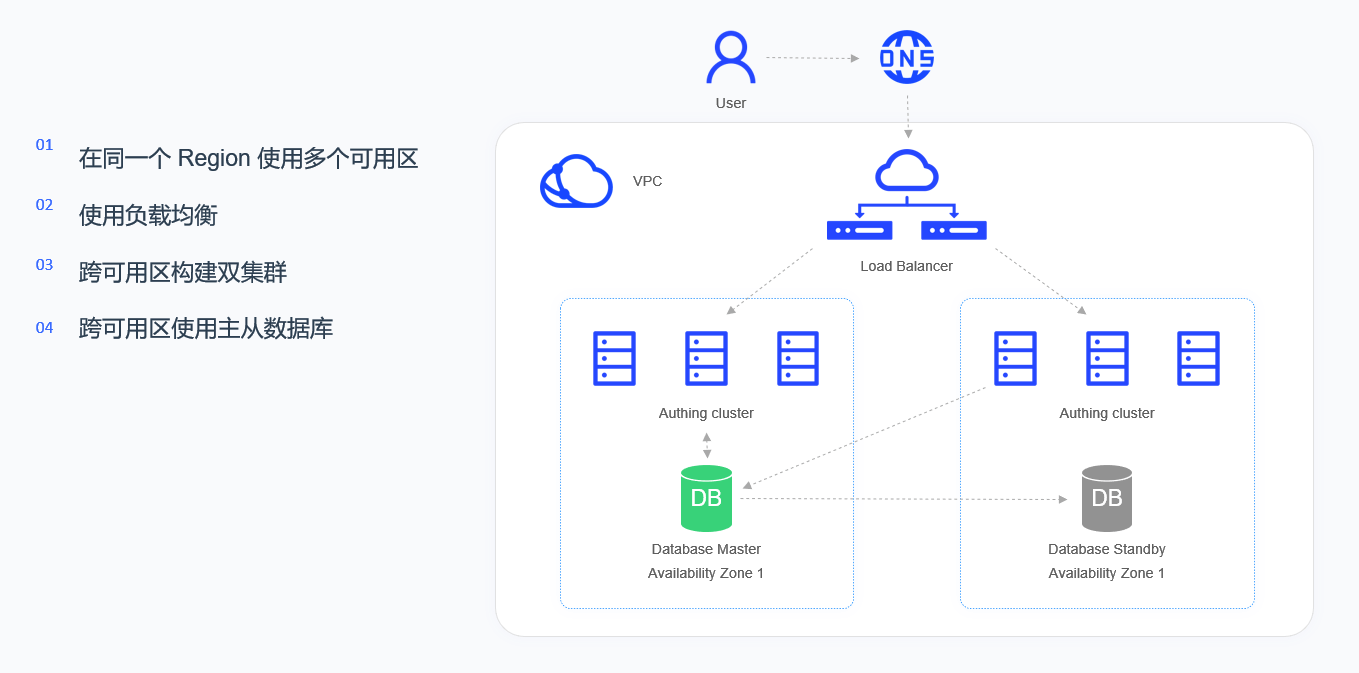
The high-availability architecture of the GenAuth IDaaS platform runs in VPC (virtual private cloud). Through LB (load balancing), the added multiple availability zones in the same region are virtualized into a high-performance and high-availability service pool, and the requests from the client are distributed to the availability zones in the service pool according to the load balancing rules.
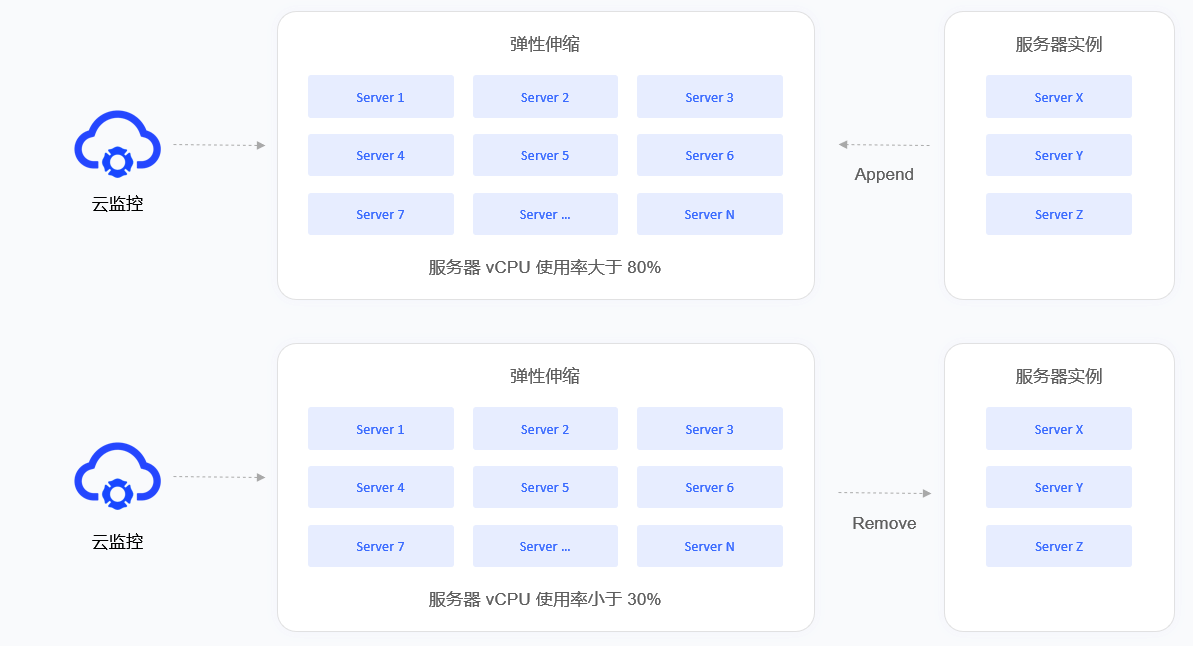
Each availability zone consists of a group of Kubernetes Nodes, and each availability zone is equipped with a complete set of GenAuth IDaaS platform. The IDaaS cluster is a stateless service, and the database cluster is a stateful master-slave synchronization architecture. If a service failure or unavailable service occurs in a certain availability zone, LB will transfer the traffic to another available availability zone, which will assume the role of Master.
Load balancing will detect the health status of each availability zone in real time and automatically isolate the availability zone in abnormal state, thereby improving the overall service capability of the application.
Deployment plan
1. Component planning
| Server | Component package | Functional description |
|---|---|---|
| ElasticSearch | elasticsearch-7.7.0 | Search engine, log service |
| GenAuth Server | authing-server-1.2.0 | GenAuth main service |
| Redis | redis-4.0.0 | Cache service |
| PostgreSQL | postgres-12.5 | Database service |
| Logstash | logstash-7.7.0 | Log collection, analysis service |
| JDBC-River | jdbc-logstash-river:1.0.0 | Backend data service |
| Staticfiles | authing-staticfiles:1.0.0 | Static resource service |
2. System environment requirements
During software installation, configuration, and debugging, you need to prepare a Kubernetes cluster. The cluster requirements are as follows:
Kubernetes version requirements:
| Project | Version |
|---|---|
| Client Version | v1.19.4 and above |
| Server Version | v1.18.3 and above |
Docker version requirements:
| Project | Version |
|---|---|
| Client | 19.03.14 and above |
| Server | 19.03.14 and above |
Operating system environment requirements:
| Project | Minimum configuration | Recommended configuration |
|---|---|---|
| Operating system platform | linux/amd64 | - |
| Kernel version | linux 3.10.0 and above | - |
Kubernetes Master node configuration requirements:
| Project | Minimum configuration | Recommended configuration |
|---|---|---|
| CPU | X86 64-bit 2 cores | X86 64-bit 4 cores |
| Memory | 8 GB and above | 16 GB and above |
| Hard disk | 500 GB | 1 TB |
| Intranet bandwidth | 1 Gbps | 10 Gbps |
Kubernetes Worker node configuration requirements:
| Project | Minimum configuration | Recommended configuration |
|---|---|---|
| CPU | X86 64-bit 4 cores | X86 64-bit 8 cores |
| Memory | 16 GB and above | 32 GB and above |
| Hard disk | 1 TB | 5 TB |
| Intranet bandwidth | 1 Gbps | 10 Gbps |
3. Related documents
| Name | Description |
|---|---|
| 《GenAuth IDaaS Platform User Guide Version 1.2.0》 | Introduces the GenAuth IDaaS platform operation guide |
| 《GenAuth IDaaS Platform Product Documentation Version 1.2.0》 | Introduces the GenAuth IDaaS platform product features |
**Note: Please contact GenAuth pre-sales staff to obtain the above resources. **
4. Image installation package
| Name | Description |
|---|---|
| authing-jdbc-logstash-river-1.0.0-90875fa84d87.tar | GenAuth backend data service image package |
| authing-server-1.2.0-32d8b4130bae.tar | GenAuth main service image package |
| authing-staticfiles-1.0.0-a70a58e3c115.tar | Static resource service image package |
| elasticsearch-7.7.0-7ec4f35ab452.tar | Search, data statistics service image package |
| logstash-7.7.0-30dcca1db5e9.tar | Log collection and analysis service image package |
| postgres-12.5-386fd8c60839.tar | Database service image package |
| redis-4.0.0-3189e099eb0f.tar | Cache service image package |
**Note: Please contact GenAuth pre-sales staff to obtain the above resources. **
5. Orchestration file
| Name | Description |
|---|---|
| namespace.yaml | Namespace orchestration file |
| GenAuth-jdbc-logstash-river-deployment.yaml | GenAuth backend data service orchestration file |
| authing-server--deployment.yaml | GenAuth main service orchestration file |
| GenAuth-staticfiles-deployment.yaml | Static resource service orchestration file |
| elasticsearch-deployment.yaml | Search, data statistics service orchestration file |
| logstash-deployment.yaml | Log collection, analysis service orchestration file |
| postgres-deployment.yaml | Database service orchestration file |
| redis-deployment.yaml | Cache service orchestration file |
**Note: Please contact GenAuth pre-sales staff to obtain the above resources. **