
How Memory Forms
New page
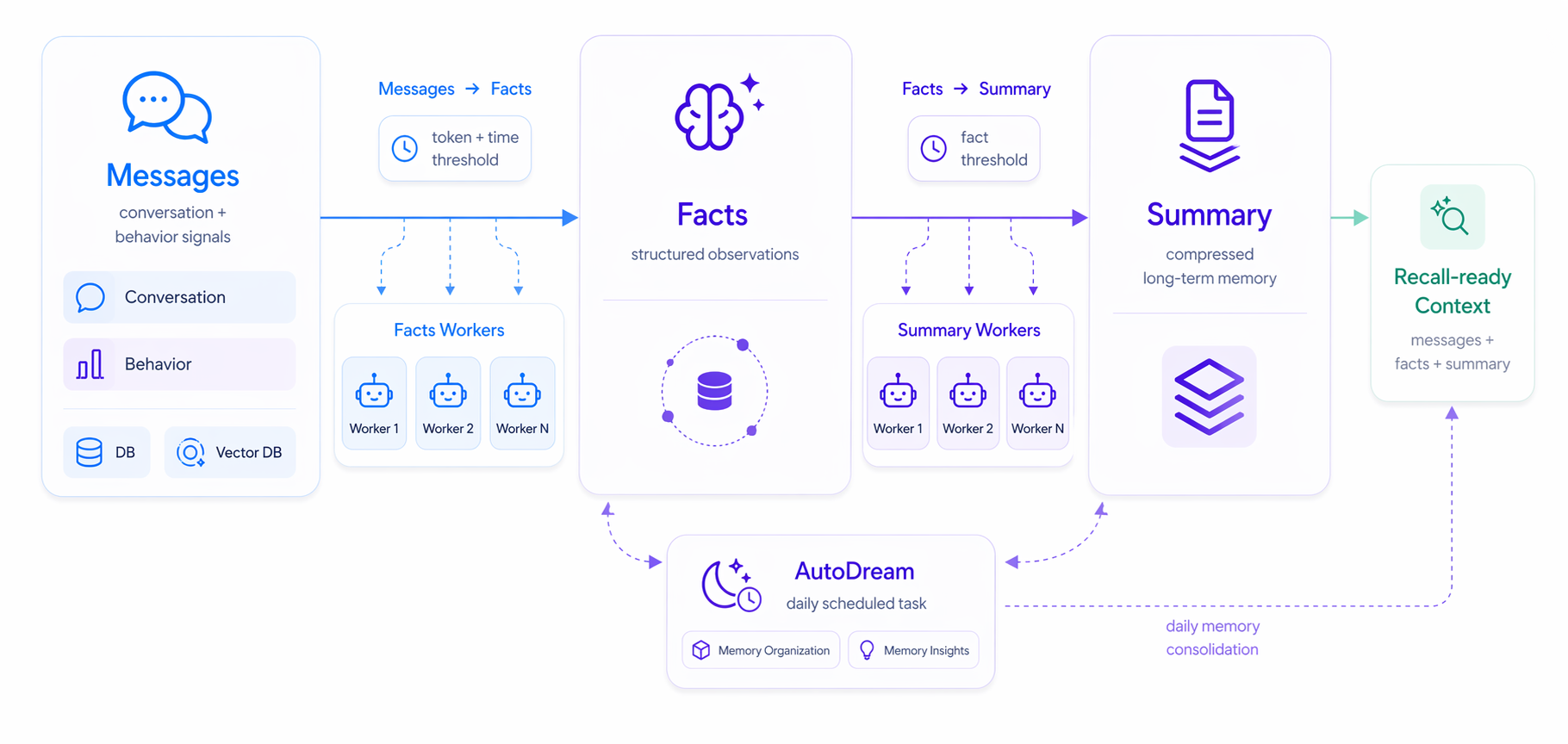
| Layer | Role | Description |
|---|---|---|
Message | Raw input | Conversation messages, searches, filters, saves, tool calls, or business events. Message preserves original context, but is not the final reusable Memory. |
Facts | Traceable facts | Facts, preferences, constraints, plans, identity, behavior patterns, or time signals extracted from Message input. Facts are the evidence layer for explanation and audit. |
Summary | Long-term memory summary | Compressed memory supported by a set of Facts and suitable for later recall. |
Topic | Recall entry point | Groups related Summary items so Query Memory can first locate the relevant memory area. |
1. Message: Raw Input
Message records what the user and Agent said in a session. It can also record what the user and Agent did in the product. Conversation messages and behavior events together form the raw input layer for Memory.
Relying only on conversation can miss behavioral intent. A user may never explicitly say “I prefer light-colored running shoes,” but repeated filters, dwell time, and saves may express that preference. Behavior Message input fills in these implicit signals.
Common fields:
| Field | Description |
|---|---|
role | Message role, such as user, assistant, or system. |
content | Raw message body or behavior description. |
timestamp | Time when the message or behavior occurred. |
event_type | Behavior type, such as search, click, filter, or tool_call. |
page | Page, scene, or business module where the behavior occurred. |
metadata | Business-defined metadata such as source, tags, device, or client information. |
2. Facts: Traceable Facts
Facts are reusable information units extracted from Message input. They should be short, specific, traceable, and only express information supported by the input.
Facts turn raw noise into searchable, citeable, updateable Memory. Compared with full messages or click streams, Facts are better for explaining why the Agent remembers something and for locating sources when a user corrects or deletes memory.
One Message may produce multiple Facts. For example, “Use Berlin for Europe, Toronto for Americas, and avoid Friday meetings” contains at least two city preferences and one meeting constraint. Tightly coupled information should stay together; “Europe defaults to Berlin” should remain one fact.
Common fields:
| Field | Description |
|---|---|
content | Extracted fact, preference, constraint, long-term goal, or behavior pattern. |
entities | Recognized entities. |
source_message_ids | Original message IDs supporting the Fact. |
labels | Labels for categorization or retrieval. |
status | Processing status, such as pending, chunked, processed, or failed. |
time_range | Time range covered by the Fact. |
created_at | Fact creation time. |
3. Summary: Long-Term Memory Summary
Summary compresses a message segment, behavior records, or a set of Facts into more stable context. It reduces long context, scattered behavior signals, and repeated information.
Summary does not replace Facts. Facts preserve individual evidence. Summary compresses information supported by multiple Facts into retrievable, governable long-term memory. For example, a shopping journey can produce one Summary about budget, size, use case, and style preferences.
Common fields:
| Field | Description |
|---|---|
content | Long-term memory text supported by Facts. This is the core text used during recall. |
topic | High-level topic label that groups the Summary by business meaning or user profile dimension. |
source_facts | Facts that directly support this Summary. |
confidence | Summary-level confidence score from 0.0 to 1.0. |
time | Event time information, including event_start and event_end. |
labels | Labels for profile scope, business category, or retrieval conditions. |
entities | Named entities explicitly associated with the Summary. |
decay_factor | Rate at which memory importance decays over time. |
validity | Validity state, such as active, invalid, or deprecated. |
memory_status | Memory management state, such as active, deprioritized, archived, or deleted. |
retrieval_boost | Retrieval ranking boost. |
evidence | Evidence supporting the Summary, such as source Facts, behavior logs, or anchors. |
anchors | Stable reference points such as order IDs, appointment IDs, or business object IDs. |
4. Topic: Recall Entry Point
Topic is the high-level organization layer for Summary. It is not a user-facing directory. It is the first layer Query Memory uses to find long-term memory.
When an Agent needs to generate the next response, GUMem uses the current query to find relevant Topic first, then retrieves Summary under that Topic. If Summary is not enough to answer the question, GUMem adds supporting Facts and recent Message context.
This context does not need to contain all history. It only keeps the signals needed for the current task, so the Agent has enough background to answer, recommend, call tools, or assess risk.
Common returned fields:
| Field | Description |
|---|---|
query | Current task or user question. |
short_term_context | Short-term context from recent Session messages. |
mid_term_context | Facts relevant to the query. |
long_term_user_context | Long-term user Summary reusable across Sessions. |
formatted_context | Final formatted context, usually ready to put into the Agent prompt. |
Failures and Boundaries
- Do not treat Summary as unchangeable truth. When the user corrects information, write a new Message so GUMem can form new Facts and Summary.
- Do not rely on GUMem to store every raw input. Write only information that can affect future answers, recommendations, tool calls, or risk decisions.
- Do not write unconfirmed guesses as Facts. If the user did not clearly state something and behavior does not provide enough evidence, preserve uncertainty.
- Do not use GUMem as a replacement for your business database. Orders, permissions, billing, inventory, and other strongly consistent data should stay in business systems.
Example: ecommerce shopping memory
This example shows how GUMem uses both conversation messages and behavior events to form Memory and recall it in a later conversation.
1. Raw input
Conversation messages
User: I want daily running shoes, not too stiff, budget under 800.
User: I mostly run in the park, about 5 km each time, and I prefer something not too flashy.
Behavior records
Filter: category = running shoes
Filter: price = 500-800
Filter: size = 42
Viewed: 4 cushioned running shoes
Saved: 2 light-colored shoes
Dwell: reviews containing “soft feel” and “daily training”
Skipped: carbon-plated racing shoes
2. Generate Facts
- The user is looking for daily running shoes.
- The user's budget is mostly under 800.
- The user often looks at size 42.
- The user prefers cushioning and a non-stiff feel.
- The user mainly runs 5 km in parks.
- The user is more interested in light-colored, understated shoes.
- The user currently does not prefer carbon-plated racing shoes.
3. Generate Summary
The user recently intended to buy daily running shoes for 5 km park runs, prefers comfortable cushioning, light understated styling, a price under 800, and likely size 42.
4. Assign Topic
Topic: running shoes5. Recall in conversation
User: Any recommendations from the shoes I looked at yesterday?

Agent: Yes. Based on what you viewed and saved yesterday, I will prioritize cushioned running shoes in size 42, priced 500-800, suitable for daily 5 km park runs, and avoid carbon-plated racing shoes. Do you want a softer feel or a lighter upper?
In this conversation, size 42, 500-800, light understated styling, and avoid carbon-plated racing shoes do not all come from explicit user text. They are completed by filters, views, saves, dwell time, and skips.
Next step
- Read Quick Start for the shortest GUMem integration path.
- Read SDK for the current SDK scope and interface status.
- Read User Case to see how these concepts work in a typical scenario.